The 15 Best Free WordPress Page Builders in 2026, Measured
SiteOrigin Page Builder (86.2/100) and Otter Blocks (86.1) lead our 15 free WordPress page builders, ahead of GenerateBlocks (84.9).
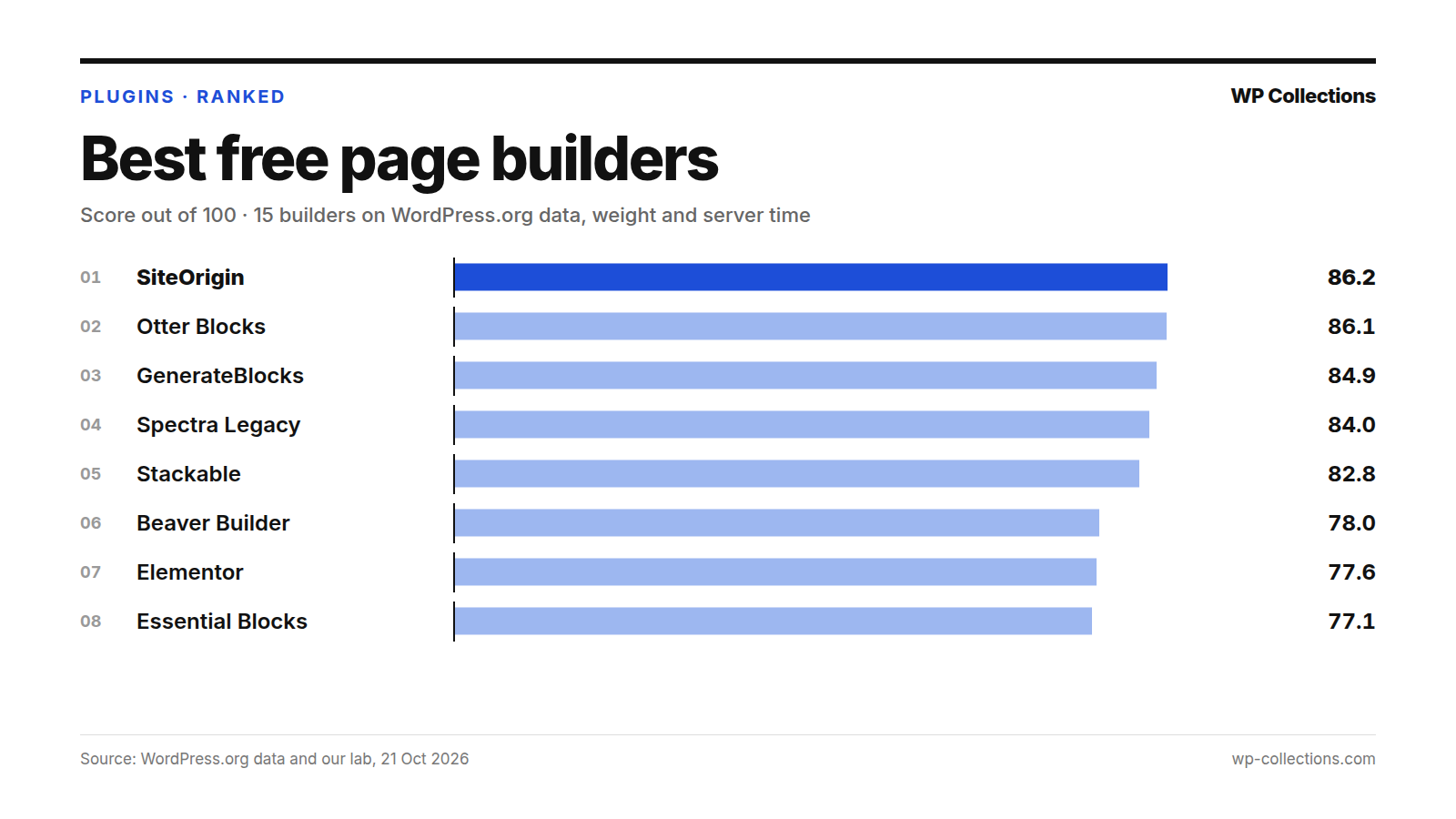
The best free WordPress page builder on our data is SiteOrigin Page Builder, with 86.2 out of 100. Otter Blocks is second on 86.1, a gap too small to mean anything, and GenerateBlocks third on 84.9. We scored 15 free builders on their WordPress.org record and on what each one added to a page that does not use it.
Idle cost decided the order. SiteOrigin added nothing to the page and +9.3 ms of server time, the least of the 15. Elementor has the third-best WordPress.org score but added +133.7 ms to a post that used none of its layouts, and drops to 7th.
Short answer: If you already write in the block editor, add GenerateBlocks or Stackable: they add layout blocks and cost +14.2 ms and +15.2 ms on pages that do not use them. If you want a separate drag-and-drop builder, SiteOrigin Page Builder has the lowest idle cost of all 15. Choose Elementor for its widgets and templates only if you accept +133.7 ms on every page.
Last updated: 21 October 2026. We re-run the numbers every month.
The top 15 at a glance
| # | Plugin | Kind | Score | Installs | Rating | Idle cost |
|---|---|---|---|---|---|---|
| 1 | SiteOrigin Page Builder | Drag-and-drop | 86.2 | 400,000+ | 96% | +0.0 KB · +9.3 ms |
| 2 | Otter Blocks | Block editor | 86.1 | 300,000+ | 94% | +0.0 KB · +57.5 ms |
| 3 | GenerateBlocks | Block editor | 84.9 | 200,000+ | 98% | +0.1 KB · +14.2 ms |
| 4 | Spectra Legacy | Block editor | 84.0 | 1M+ | 94% | +0.1 KB · +78.9 ms |
| 5 | Stackable | Block editor | 82.8 | 100,000+ | 98% | +0.1 KB · +15.2 ms |
| 6 | Beaver Builder | Drag-and-drop | 78.0 | 100,000+ | 94% | +0.1 KB · +48.0 ms |
| 7 | Elementor | Drag-and-drop | 77.6 | 10M+ | 90% | +0.6 KB · +133.7 ms |
| 8 | Essential Blocks | Block editor | 77.1 | 200,000+ | 98% | +0.7 KB · +122.8 ms |
| 9 | Greenshift | Block editor | 76.2 | 70,000+ | 96% | +0.1 KB · +14.1 ms |
| 10 | Kadence Blocks | Block editor | 74.5 | 600,000+ | 96% | +3.6 KB · +147.1 ms |
| 11 | Pagelayer | Drag-and-drop | 73.7 | 400,000+ | 78% | +0.0 KB · +14.5 ms |
| 12 | Visual Composer | Drag-and-drop | 71.2 | 30,000+ | 92% | +0.2 KB · +46.7 ms |
| 13 | Brizy | Drag-and-drop | 70.0 | 60,000+ | 94% | +34.5 KB · +16.8 ms |
| 14 | CoBlocks | Block editor | 60.0 | 300,000+ | 84% | +22.5 KB · +24.4 ms |
| 15 | Live Composer | Drag-and-drop | 51.9 | 10,000+ | 88% | +125.8 KB · +80.5 ms |
Drag-and-drop builder or block plugin: pick the kind first
These 15 plugins build page layouts without code in two different ways, and the kind decides where you edit.
- Drag-and-drop builders (SiteOrigin, Beaver Builder, Elementor, Pagelayer, Visual Composer, Brizy, Live Composer) give you their own editing screen, where you drag rows, columns and widgets into place.
- Block plugins (Otter, GenerateBlocks, Spectra Legacy, Stackable, Essential Blocks, Greenshift, Kadence Blocks, CoBlocks) add blocks and design controls to the block editor WordPress already ships, also called Gutenberg. You keep writing in the same editor.
SiteOrigin blurs the line: it can place a layout in the block editor through its Layout Block. If your site is mostly posts, a block plugin adds layouts without a second editor to learn. If you mostly build landing pages and want to see the page as you drag, a drag-and-drop builder fits.
The kind does not predict the idle cost. Drag-and-drop builders ranged from +9.3 ms (SiteOrigin) to +133.7 ms (Elementor), block plugins from +14.1 ms (Greenshift) to +147.1 ms (Kadence Blocks).
How we scored them
The test post used none of these plugins: no builder layout and none of their blocks. So every lab number is the plugin’s idle cost, what it adds to pages where it does nothing, which on most sites is nearly every post. We did not measure pages built with them.
- WordPress.org record, 80 points: our usual score out of 100, scaled to 80. Satisfaction 35 (rating blended with 25 imaginary votes at 80%), Adoption 25 (installs, log scale, 1,000 = 0 and 1,000,000 = full), Maintenance 20 (full within 30 days of an update, zero at 365), Support 20 (share of the last two months’ threads resolved; under 3 threads = half marks).
- Weight, 10 points: 0 KB added = 10, 40 KB or more = 0, in a straight line between.
- Server time, 10 points: 10 ms or less added = 10, 100 ms or more = 0, in a straight line between.
Lab: fresh WordPress 7.1.3, PHP 8.5, Twenty Twenty-Five. Each plugin was installed from WordPress.org on 21 October 2026, activated alone with default settings and timed on a 1,500-word post for a logged-out visitor: the median of 15 requests, minus the same page with no plugin. Each plugin ran three separate times and we use the median. With no plugin the page weighed 19.8 KB and took 64.1 to 66.3 ms.
Server time on this box drifts 15–40 ms between runs, so gaps under about 15 ms are noise: the six plugins between +9.3 ms and +16.8 ms are a tie. The full method is on how we rank.
Some builders cost every page
Three plugins added more than 100 ms of server time to a post that used none of their features: Kadence Blocks (+147.1 ms), Elementor (+133.7 ms) and Essential Blocks (+122.8 ms). The page took about 65 ms with no plugin, so each roughly tripled the server’s work on it. Their runs agreed within about 9 ms, so this is not noise.
Weight is the other cost. Live Composer added +125.8 KB in 13 extra files, taking our 19.8 KB test page past 145 KB. Brizy added +34.5 KB and CoBlocks +22.5 KB. The other 12 added 3.6 KB or less, so they load their CSS and JavaScript only where a page uses them.
1. SiteOrigin Page Builder, 86.2
Page Builder by SiteOrigin is a drag-and-drop builder that makes responsive, column-based layouts from standard WordPress widgets, with live editing, a history browser to undo changes, and row, cell and widget styles. Its page says it is free “and always will be”.
It added 0.0 KB and +9.3 ms, no weight and the lowest server time of the 15, so it took all 20 lab points. It has 400,000+ installs and 96% (1,005 ratings), but its WordPress.org score is only fifth, 82.8: 1 support thread in two months gets half marks. Its page points to the separate SiteOrigin Widgets Bundle for the common widgets, which we did not measure.
2. Otter Blocks, 86.1
Otter Blocks – Gutenberg Blocks, Page Builder for Gutenberg Editor & FSE lists more than 20 extra blocks, patterns and full-page templates, plus visibility conditions, custom CSS and animations for any block. Its free blocks include a contact form, popup, tabs and sliders.
Its WordPress.org record is the second best here, 89.3, with 5 of 5 threads resolved and 94% (250 ratings). It added 0.0 KB but +57.5 ms, steady at 55.4 to 62.3 ms across runs. That cost it 5.3 of 10 points and first place by 0.1, which is no real difference. Pick it for one block plugin that also covers forms and popups.
3. GenerateBlocks, 84.9
GenerateBlocks offers a handful of blocks meant to be learned deeply: Container, Grid, Text, Button, Query, Image and Shape, plus dynamic tags such as post title and featured image. Its page says it generates minimal CSS “only for the blocks you need”.
That held in the lab: +0.1 KB and a median +14.2 ms (runs 25.7, 14.2, 11.2). It is rated 98% (122 ratings), with 3 of 5 threads resolved. It is built to pair with the GeneratePress theme but runs with any; see GeneratePress vs Kadence vs Blocksy. Seven blocks means fewer ready-made pieces than Otter offers.
4. Spectra Legacy, 84.0
Spectra Legacy – Gutenberg Blocks is the plugin formerly called Spectra. Its page says it now gets “security and compatibility updates and full support, but no new features”; new features go into Spectra Blocks, a separate plugin “aimed at new installs”, which we did not test.
It has the best WordPress.org score of the 15, 89.6, with 1M+ installs and 94% (1,872 ratings), and a large library: containers, sliders, tabs, forms and a popup builder. Server time pulled it down: +78.9 ms (runs 60.3, 78.9, 79.1), worth 2.3 of 10. Existing sites have nothing to migrate; for a new site, you would be installing a plugin that gets no new features.
5. Stackable, 82.8
Stackable – Page Builder Gutenberg Blocks lists 42 custom blocks, a global design system for colors, typography and spacing, and ready-made designs and page templates. You can turn off blocks you do not need.
It has the highest blended rating of the 15, 98% from 522 ratings, and added +0.1 KB and +15.2 ms. Adoption and support hold it down: 100,000+ installs, and one recent thread, unresolved, which scores half marks.
6. Beaver Builder, 78.0
Beaver Builder Page Builder – Drag and Drop Website Builder is a front-end drag-and-drop builder. The free version has modules such as photo, button, heading, menu, text, video and a Box module for flexbox and CSS grid layouts. Contact forms, sliders, layout templates and its theme builder are premium.
It added +0.1 KB and +48.0 ms, worth 5.8 of 10, and is rated 94% (394 ratings). Its page says the team “provides very limited support on the WordPress.org forums”; 3 of 5 recent threads were resolved.
7. Elementor, 77.6
Elementor Website Builder – more than just a page builder is the most installed plugin here, 10M+. Its page lists a drag-and-drop editor, over 40 free widgets, a template library with full website kits, and revision history.
On WordPress.org data alone it is third, 84.8, with 90% (7,319 ratings) and 44 of 65 threads resolved, the busiest forum in the list. Idle cost moved it to seventh: +0.6 KB and +133.7 ms, steady between 128.9 and 134.6 ms, worth 0 of 10. It suits a site that will build many pages with it; on a blog where most posts never use it, every one of those posts still pays.
8. Essential Blocks, 77.1
Gutenberg Essential Blocks – Page Builder for Gutenberg Blocks & Patterns lists 70+ free blocks, global colors and typography, AI writing and image tools, and a switch to turn off blocks you do not use.
Its page says it loads “only the resources that are currently used”. On weight that held, +0.7 KB; server time did not, +122.8 ms. Its WordPress.org record is strong, 84.1, with 98% (215 ratings).
9. Greenshift, 76.2
Greenshift – animation and page builder blocks centers on animation: scroll animations and hover transitions, interaction layers, flexbox and CSS grid containers, sliders and a popup builder. Its page says assets load “only when you use it”.
The lab agrees: +0.1 KB and +14.1 ms, level with GenerateBlocks and Stackable. Its WordPress.org score, 70.9, holds it back: 70,000+ installs and 1 of 3 threads resolved.
10. Kadence Blocks, 74.5
Kadence Blocks – Page Builder Toolkit for Gutenberg Editor adds row layouts, advanced buttons and text, galleries, a form block, accordions, countdowns and a posts grid.
It has 600,000+ installs and 96% (332 ratings), with 6 of 15 threads resolved. It had the highest idle server time of the 15, +147.1 ms (runs 140.2, 149.3, 147.1), plus +3.6 KB. That moved it from sixth on WordPress.org data to tenth.
11. Pagelayer, 73.7
Page Builder: Pagelayer – Drag and Drop website builder is a real-time drag-and-drop builder with 100+ widgets. Its idle cost is low, 0.0 KB and +14.5 ms, but its rating is the weakest here, 78% (104 ratings), and it lists WordPress 7.0.7 as tested, older than the 7.1.3 we ran.
12. Visual Composer, 71.2
Visual Composer Website Builder is a front-end builder with 50+ free elements and 10+ free landing page templates. Its FAQ says the free version works inside your theme’s content area; header, footer and sidebar design are Premium. It added +0.2 KB and +46.7 ms, and 30,000+ installs earn 12.3 of 25 for adoption.
13. Brizy, 70.0
Brizy – Page Builder is a drag-and-drop builder that shows options next to the element you are editing; its page lists 500+ pre-made blocks and 4,000+ icons.
It added +34.5 KB in 2 extra files to a page that did not use it, worth 1.4 of 10, though its server time was low, +16.8 ms. Users rate it 94% (971 ratings); with no support threads in two months, support gets half marks.
14. CoBlocks, 60.0
Page Builder Gutenberg Blocks – CoBlocks adds more than 30 blocks, from pricing tables and FAQ to galleries and food menus, plus row and column blocks. Its FAQ says it is “100% free and always will be”.
It was last updated 5 March 2026, 230 days before our data pull, and lists WordPress 6.8.11 as tested. It added +22.5 KB in 6 extra files and +24.4 ms, and is rated 84% (109 ratings).
15. Live Composer, 51.9
Live Composer – Free WordPress Website Builder is an open-source, front-end drag-and-drop builder with premium extensions for things like WooCommerce integration. It had the heaviest idle cost by far, +125.8 KB and +80.5 ms, scoring 0 of 10 for weight and 2.2 for server time, and has 10,000+ installs, the fewest here.
Every plugin we measured
| # | Plugin | Score | WordPress.org /100 | Weight /10 | Server time /10 | Updated |
|---|---|---|---|---|---|---|
| 1 | SiteOrigin Page Builder | 86.2 | 82.8 | 10.0 | 10.0 | 19 Oct 2026 |
| 2 | Otter Blocks | 86.1 | 89.3 | 10.0 | 4.7 | 19 Oct 2026 |
| 3 | GenerateBlocks | 84.9 | 81.7 | 10.0 | 9.5 | 13 Oct 2026 |
| 4 | Spectra Legacy | 84.0 | 89.6 | 10.0 | 2.3 | 9 Oct 2026 |
| 5 | Stackable | 82.8 | 79.2 | 10.0 | 9.4 | 13 Oct 2026 |
| 6 | Beaver Builder | 78.0 | 77.7 | 10.0 | 5.8 | 19 Oct 2026 |
| 7 | Elementor | 77.6 | 84.8 | 9.8 | 0.0 | 13 Oct 2026 |
| 8 | Essential Blocks | 77.1 | 84.1 | 9.8 | 0.0 | 19 Oct 2026 |
| 9 | Greenshift | 76.2 | 70.9 | 10.0 | 9.5 | 20 Oct 2026 |
| 10 | Kadence Blocks | 74.5 | 81.7 | 9.1 | 0.0 | 19 Oct 2026 |
| 11 | Pagelayer | 73.7 | 67.8 | 10.0 | 9.5 | 24 Sep 2026 |
| 12 | Visual Composer | 71.2 | 69.2 | 9.9 | 5.9 | 7 Oct 2026 |
| 13 | Brizy | 70.0 | 74.3 | 1.4 | 9.2 | 19 Oct 2026 |
| 14 | CoBlocks | 60.0 | 59.0 | 4.4 | 8.4 | 5 Mar 2026 |
| 15 | Live Composer | 51.9 | 62.1 | 0.0 | 2.2 | 21 Sep 2026 |
What we left out, and why
No plugin on our list fell out of the running: all 15 are open on WordPress.org, were updated within 365 days and have more than 1,000 installs. CoBlocks came closest to the line, 230 days after its last update.
We rank free plugins on WordPress.org data, so builders sold only outside it are not here, nor are add-on packs that need another builder first. Spectra Blocks, where Spectra Legacy’s page sends new installs, was not part of this test.
How to choose the best free WordPress page builder
- Pick the kind: a block plugin if you want layouts inside the block editor, a drag-and-drop builder if you want a separate visual editor.
- For a block plugin with a low idle cost, start with GenerateBlocks (+14.2 ms) or Stackable (+15.2 ms), or Greenshift (+14.1 ms) for animation.
- For a drag-and-drop builder, SiteOrigin has the lowest idle cost (0.0 KB, +9.3 ms). Beaver Builder (+48.0 ms) and Elementor (+133.7 ms) cost more on every page.
- Read the status lines: Spectra Legacy gets no new features, and CoBlocks has not been updated since 5 March 2026.
- Pair it with a light theme (see the fastest free WordPress themes), then time a logged-out post before and after activating the builder.
Questions people ask
Which is the best free WordPress page builder?
On our data, SiteOrigin Page Builder, with 86.2 out of 100, level with Otter Blocks on 86.1. Among block plugins with a low idle cost, GenerateBlocks is third on 84.9.
Is Elementor free?
There is a free version on WordPress.org, with over 40 free widgets and a template library; Elementor Pro adds more. It scored 77.6, seventh of 15, because it added +133.7 ms to a post that did not use it.
Do page builders slow down WordPress?
Some do, even on pages that do not use them. On a post with no builder layout, added server time ran from +9.3 ms to +147.1 ms and weight from 0.0 KB to +125.8 KB. 12 of the 15 added 3.6 KB or less.
What happened to Spectra?
It is now Spectra Legacy, at the same WordPress.org address. It keeps getting security and compatibility updates, but new features go into a separate plugin, Spectra Blocks. Spectra Legacy scored 84.0, fourth.