The 10 Best Free WordPress Event Calendar Plugins in 2026, Ranked by Data
The Events Calendar is the best free WordPress event calendar plugin on our data (78.3/100), ahead of VS Event List (71.3) and My Calendar (68.8), in a weak field.
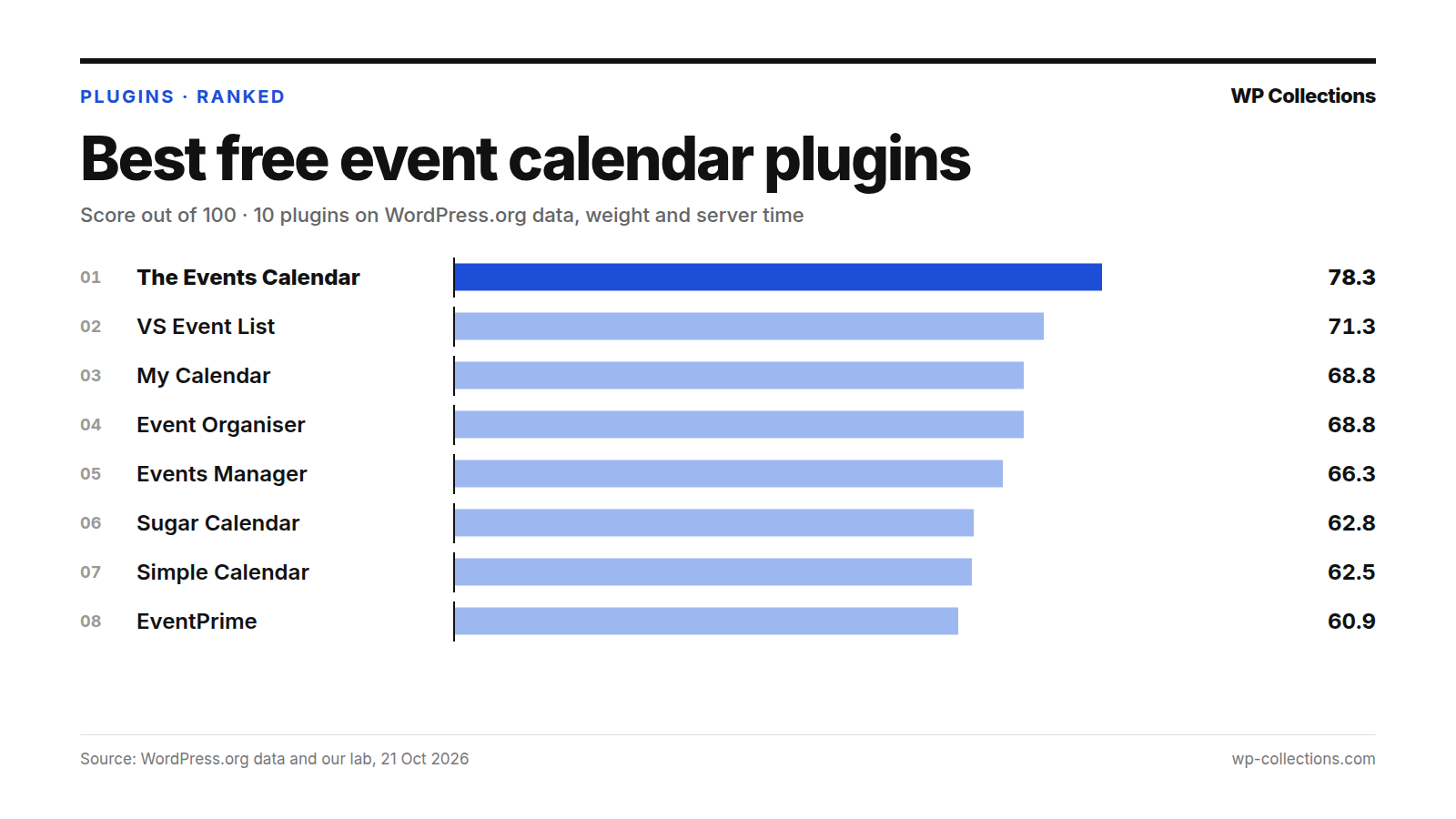
The best free WordPress event calendar plugin on our data is The Events Calendar, with 78.3 out of 100. VS Event List is second on 71.3, and My Calendar third on 68.8, level with Event Organiser on the rounded score. We scored 10 free calendar and events plugins on their WordPress.org record and on what each one adds to a page that shows no calendar.
This is a weak field, and the scores say so. 78.3 is the lowest winning score in any of our October lists, and only one plugin here has more than 60,000 installs. The Events Calendar wins on its record: 600,000+ installs, 58 of 62 recent support threads resolved and an update six days before our data pull. It also added the most server time of the 10, about +80 ms in all three lab runs, and still finished 7 points clear.
Short answer: For a full events calendar with venues and organizers, install The Events Calendar. For a plain list of upcoming events that adds almost nothing to your pages, use VS Event List. For accessibility or free recurring events, pick My Calendar or Event Organiser. To take bookings, look at Events Manager or Sugar Calendar. If your events already live in Google Calendar, Simple Calendar shows them without entering them again.
Last updated: 21 October 2026. We re-run the numbers every month.
The top 10 at a glance
| # | Plugin | Score | Installs | Rating | Weight | Server time |
|---|---|---|---|---|---|---|
| 1 | The Events Calendar | 78.3 | 600,000+ | 84% | +1.0 KB | +79.6 ms |
| 2 | VS Event List | 71.3 | 8,000+ | 98% | +1.0 KB | +15.7 ms |
| 3 | My Calendar | 68.8 | 20,000+ | 94% | +89.4 KB | +12.8 ms |
| 4 | Event Organiser | 68.8 | 20,000+ | 92% | +2.6 KB | +12.5 ms |
| 5 | Events Manager | 66.3 | 60,000+ | 84% | +251.3 KB | +19.4 ms |
| 6 | Sugar Calendar | 62.8 | 10,000+ | 90% | 0 KB | +57.3 ms |
| 7 | Simple Calendar | 62.5 | 50,000+ | 76% | 0 KB | +12.2 ms |
| 8 | EventPrime | 60.9 | 7,000+ | 88% | +69.8 KB | +56.0 ms |
| 9 | EventON | 55.9 | 6,000+ | 82% | +214.7 KB | +23.0 ms |
| 10 | WP Event Manager | 55.3 | 20,000+ | 80% | +79.0 KB | +10.9 ms |
How we scored them
An events plugin shows its calendar on a page or two but loads on all of them. Our test post has no calendar on it, so every lab number here is the plugin’s idle cost: what it adds to the pages where it does nothing, which on most sites is almost every page. A plugin that adds 0 KB loads its files only where they are used; one that adds 90 KB loads them everywhere. We did not measure what any plugin costs on the page that shows its calendar.
- WordPress.org record, 80 points: our usual score out of 100, scaled to 80. Satisfaction 35 (rating blended with 25 imaginary votes at 80%), Adoption 25 (installs, log scale, 1,000 = 0 and 1,000,000 = full), Maintenance 20 (full within 30 days of an update, zero at 365), Support 20 (share of the last two months’ threads resolved; under 3 threads = half marks).
- Weight, 10 points: 0 KB added = 10, 40 KB or more = 0, in a straight line between.
- Server time, 10 points: 10 ms or less added = 10, 100 ms or more = 0, in a straight line between.
Lab: fresh WordPress 7.1.3, PHP 8.5, Twenty Twenty-Five. Each plugin was installed from WordPress.org on 21 October 2026, activated alone with default settings and loaded on a 1,500-word post by a logged-out visitor. Weight is the gzipped HTML plus every CSS and JS file the page links, minus the same page with no plugin (19.9 KB). Server time is the median of 15 requests minus the no-plugin median, measured in three separate runs; the score uses the median of the three.
Server time on this box drifts 15–40 ms between runs, and the no-plugin baseline moved from 58.9 to 68.4 ms, so we read nothing into a gap under about 15 ms. Weight does not drift. The full method is on how we rank.
1. The Events Calendar, 78.3
The Events Calendar gives you events with saved venues and organizers, a month view with tooltips, list and day views, event search, Google Maps, an upcoming events widget, Google Calendar and iCal export and JSON-LD structured data. Its page points to Events Calendar Pro and add-ons for recurring events, ticket sales, user-submitted events and automatic imports.
Its record carries it. 600,000+ installs, ten times the next plugin, earn 23.2 of 25 for adoption, and 58 of 62 threads were resolved, though its FAQ says the team checks the free forum about once a week. Its rating, 84% (2,459 ratings), is middling. On WordPress.org data alone it would still be first, 82.8.
The cost is server time. It added a median +79.6 ms, with runs of +79.6 ms, +82.0 ms and +74.2 ms: steady, not noise. That is worth 2.3 of 10. Weight is small, +1.0 KB. Pages served from a page cache skip that work for logged-out visitors; we rank those plugins in the best free cache plugins.
2. VS Event List, 71.3
VS Event List (its WordPress.org address still reads very-simple-event-list) creates an event list. You add it with a block, shortcode or widget, show upcoming, current or past events, sort them into categories and share them by RSS or iCal feed. Its page describes a list and does not mention a calendar grid, so choose it if a list is what you want.
The lab moved it up. On WordPress.org data it is fifth, 65.1, but it added +1.0 KB and a median +15.7 ms, with all three runs between +15.7 ms and +17.4 ms, and took 19.2 of the 20 lab points. Users rate it 98% (82 ratings), the highest here.
The limits are adoption and evidence. 8,000+ installs earn 7.5 of 25, and with one support thread in two months, support got half marks by default. It was last updated 19 August 2026, 63 days before our pull.
3. My Calendar, 68.8
My Calendar – Accessible Event Manager shows events as a grid, cards or a list, in month, multi-month, week or day views, plus a mini-calendar. The free version handles recurring events, including editing single dates in a series, locations, JSON-LD for events and venues, and iCal or Google Calendar export. Its page says it is built accessibility first, with settings to describe the accessibility of each event and venue. User-submitted events and imports are in My Calendar Pro.
It is second on WordPress.org data, 73.9: 94% (159 ratings), 21 of 28 threads resolved and an update on 20 October 2026, the day before our pull. Weight costs it all 10 points: it added +89.4 KB across 14 files to a page with no calendar. Server time was noisy, +28.0 ms, +12.8 ms and +9.9 ms, median +12.8 ms.
It ties Event Organiser on 68.8 and ranks ahead on the unrounded score.
4. Event Organiser, 68.8
Event Organiser makes events a custom post type, so they behave like posts. Its page highlights complex recurring schedules, such as “On the third Tuesday of every fourth month”, venues with Google Maps, a full calendar shortcode with category and venue filters, calendar, list and agenda widgets, iCal import and export, and public event feeds.
It is one of the lightest here, +2.6 KB and a median +12.5 ms (runs of +12.5 ms, +15.1 ms and +8.6 ms), and users rate it 92% (140 ratings). It is sixth on WordPress.org data, 62.2, and climbs to fourth on its lab numbers.
Maintenance holds it back. It was last updated 28 June 2026, 115 days before our pull, and is tested only to WordPress 7.0.0, the oldest of the 10. Two support threads in two months meant half marks for support.
5. Events Manager, 66.3
Events Manager – Calendar, Bookings, Tickets, Appointments and more! is an event calendar and booking system. The free version lists recurring and multi-day events, timeslots for appointments, bookings with approvals, attendee lists and CSV export, multiple ticket types, locations with Google Maps, iCal feeds and blocks for the calendar and event list. Online payments, PDF tickets and waiting lists are Pro.
It is third on WordPress.org data, 71.6, with 60,000+ installs, 84% (551 ratings) and 35 of 44 threads resolved. It has been on WordPress.org since 6 August 2008, the longest of the 10.
Weight is the problem. It added +251.3 KB across 17 files, the most here, taking our 19.9 KB test page to 271.2 KB with no calendar on it. Server time was a moderate +19.4 ms.
6. Sugar Calendar, 62.8
Sugar Calendar – Events Calendar, Event Tickets, and Events Management Platform shows events as a monthly calendar or an upcoming events list, with month, week and day views. Its free version sells tickets through Stripe, issues free tickets, adds registration forms, connects Zoom and Google Meet, and syncs both ways with Google Calendar. Recurring events are in the premium versions.
It added 0.0 KB, so it loads nothing on pages without events. Server time went the other way: a median +57.3 ms, with runs of +57.3 ms, +62.3 ms and +31.5 ms. That is noisy, but above +30 ms every time. Its 90% rating comes from only 24 ratings, which our blend pulls toward 80%, and 10,000+ installs earn 8.3 of 25.
7. Simple Calendar, 62.5
Simple Calendar – Google Calendar Plugin displays events from any public Google Calendar. You keep managing events in Google Calendar, and its page says there is no need to create events in WordPress. It shows them in monthly grid and list views. Private calendars and week and day views come with paid add-ons.
It is last on WordPress.org data, 53.4. Its rating is the lowest here, 76% (397 ratings), and 1 of 4 recent threads was resolved. It needs PHP 8.1, the highest minimum of the 10, and is tested to WordPress 7.0.7.
The lab lifts it three places. It added 0.0 KB and a median +12.2 ms, though the runs ranged from -1.8 ms to +15.6 ms, so read that as close to zero. With 50,000+ installs it is the third most used plugin here.
8. EventPrime, 60.9
EventPrime – Events Calendar, Bookings, Tickets & AI offers month, week, agenda and day calendar views, multi-day and recurring events, payments for bookings via PayPal and Stripe, multiple ticket types and frontend event submissions. It also sells extensions, Stripe Payments among them.
It has the best support record of the 10: 14 of 14 threads resolved, full marks. That puts it fourth on WordPress.org data, 70.0, despite 7,000+ installs. The lab drops it to eighth. It added +69.8 KB across 13 files and a median +56.0 ms, steady across runs (+55.8 ms to +57.3 ms), and earned 4.9 of 20 lab points.
9. EventON, 55.9
EventON – Events Calendar is the free Lite version of EventON, with month, schedule, tile and live-now views, repeating and virtual events, Google Maps, event schema and a block. Tickets, RSVP and seats belong to the paid full version.
It has the fewest installs here, 6,000+, and the newest listing, added 22 January 2022. It added +214.7 KB across 17 files, 3 of them from outside the site, the only plugin here that loads external files on an idle page. Server time was +23.0 ms. It is rated 82% (44 ratings), with 7 of 10 threads resolved.
10. WP Event Manager, 55.3
WP Event Manager – Events Calendar, Registrations, Sell Tickets with WooCommerce manages event listings: a box or list view, event search with filters, a frontend submission form with a field editor, and WooCommerce compatibility. Read the name with care. Its page lists Event Calendar, Sell Tickets, Event Registration and Recurring Events among its premium add-ons, so the free plugin is an event listing tool.
It added +79.0 KB across 13 files and a median +10.9 ms (runs of +7.7 ms to +16.3 ms). It was last updated 22 July 2026, 91 days before our pull, and is tested to WordPress 7.0.7. It is rated 80% (249 ratings), with 3 of 5 threads resolved.
Every plugin we measured
| # | Plugin | Score | WordPress.org /100 | Weight /10 | Server time /10 | Updated |
|---|---|---|---|---|---|---|
| 1 | The Events Calendar | 78.3 | 82.8 | 9.8 | 2.3 | 15 Oct 2026 |
| 2 | VS Event List | 71.3 | 65.1 | 9.8 | 9.4 | 19 Aug 2026 |
| 3 | My Calendar | 68.8 | 73.9 | 0.0 | 9.7 | 20 Oct 2026 |
| 4 | Event Organiser | 68.8 | 62.2 | 9.3 | 9.7 | 28 Jun 2026 |
| 5 | Events Manager | 66.3 | 71.6 | 0.0 | 9.0 | 12 Oct 2026 |
| 6 | Sugar Calendar | 62.8 | 60.1 | 10.0 | 4.7 | 15 Oct 2026 |
| 7 | Simple Calendar | 62.5 | 53.4 | 10.0 | 9.8 | 7 Oct 2026 |
| 8 | EventPrime | 60.9 | 70.0 | 0.0 | 4.9 | 6 Oct 2026 |
| 9 | EventON | 55.9 | 59.1 | 0.0 | 8.6 | 5 Oct 2026 |
| 10 | WP Event Manager | 55.3 | 56.7 | 0.0 | 9.9 | 22 Jul 2026 |
| – | Modern Events Calendar Lite | – | Closed | – | – | Closed 11 May 2022 |
| – | Timely All-in-One Events Calendar | – | Closed | – | – | Closed 21 Aug 2025 |
What we left out, and why
Two plugins that many lists still recommend are closed on WordPress.org and cannot be installed from it. Modern Events Calendar Lite was closed on 11 May 2022. Timely All-in-One Events Calendar was closed on 21 August 2025. WordPress.org marks both closures as permanent, so a site still running either gets no further updates from it.
How to choose a free WordPress event calendar plugin
- Decide what visitors should see: a calendar grid, a list of upcoming events, or a page where they book and pay.
- For a calendar with venues and organizers, start with The Events Calendar. Its recurring events need Pro; My Calendar, Event Organiser, Events Manager, EventPrime and EventON list recurring events in their free versions.
- For a list only, use VS Event List, which added about 1 KB to an idle page.
- For bookings, compare Events Manager (payments are Pro), Sugar Calendar (Stripe tickets in the free version) and EventPrime (its page lists PayPal and Stripe). If you only need sign-ups for one event, a form plugin may be enough: see the best free contact form plugins.
- If your events already live in Google Calendar, use Simple Calendar to show them, or Sugar Calendar to sync both ways.
- Check the idle cost on your own site. Load a page with no calendar before and after activating, and compare its size and time. Events Manager and EventON each added more than 200 KB to every page in our lab.
Questions people ask
Which is the best free WordPress calendar plugin?
On our data, The Events Calendar, with 78.3 out of 100. VS Event List (71.3) is second if a simple list of events is enough, and My Calendar (68.8) third.
Do event calendar plugins slow down every page?
Some do. On a post with no calendar, five of the 10 added more than 40 KB, led by Events Manager (+251.3 KB) and EventON (+214.7 KB). Sugar Calendar and Simple Calendar added nothing. Server time ranged from +10.9 ms for WP Event Manager to +79.6 ms for The Events Calendar.
Which free event plugins handle recurring events?
By their own pages: My Calendar, Event Organiser, Events Manager, EventPrime and EventON Lite include them. The Events Calendar, Sugar Calendar and WP Event Manager keep recurring events in paid versions or add-ons.
Can I sell event tickets with a free plugin?
Sugar Calendar sells tickets through Stripe in its free version, and EventPrime’s page lists paid bookings via PayPal and Stripe. Events Manager handles bookings and ticket types for free but puts online payments in Pro. WP Event Manager sells tickets through a premium add-on.
What happened to Modern Events Calendar Lite and All-in-One Event Calendar?
Both are closed on WordPress.org: Modern Events Calendar Lite on 11 May 2022 and Timely All-in-One Events Calendar on 21 August 2025. Neither can be installed from WordPress.org, so we did not rank them.