The 8 Best Free WordPress Related Posts Plugins in 2026, Tested
Contextual Related Posts is the best free WordPress related posts plugin on our data (76.7/100), ahead of Related Posts Thumbnails (74.1) and Inline Related Posts (72.5).
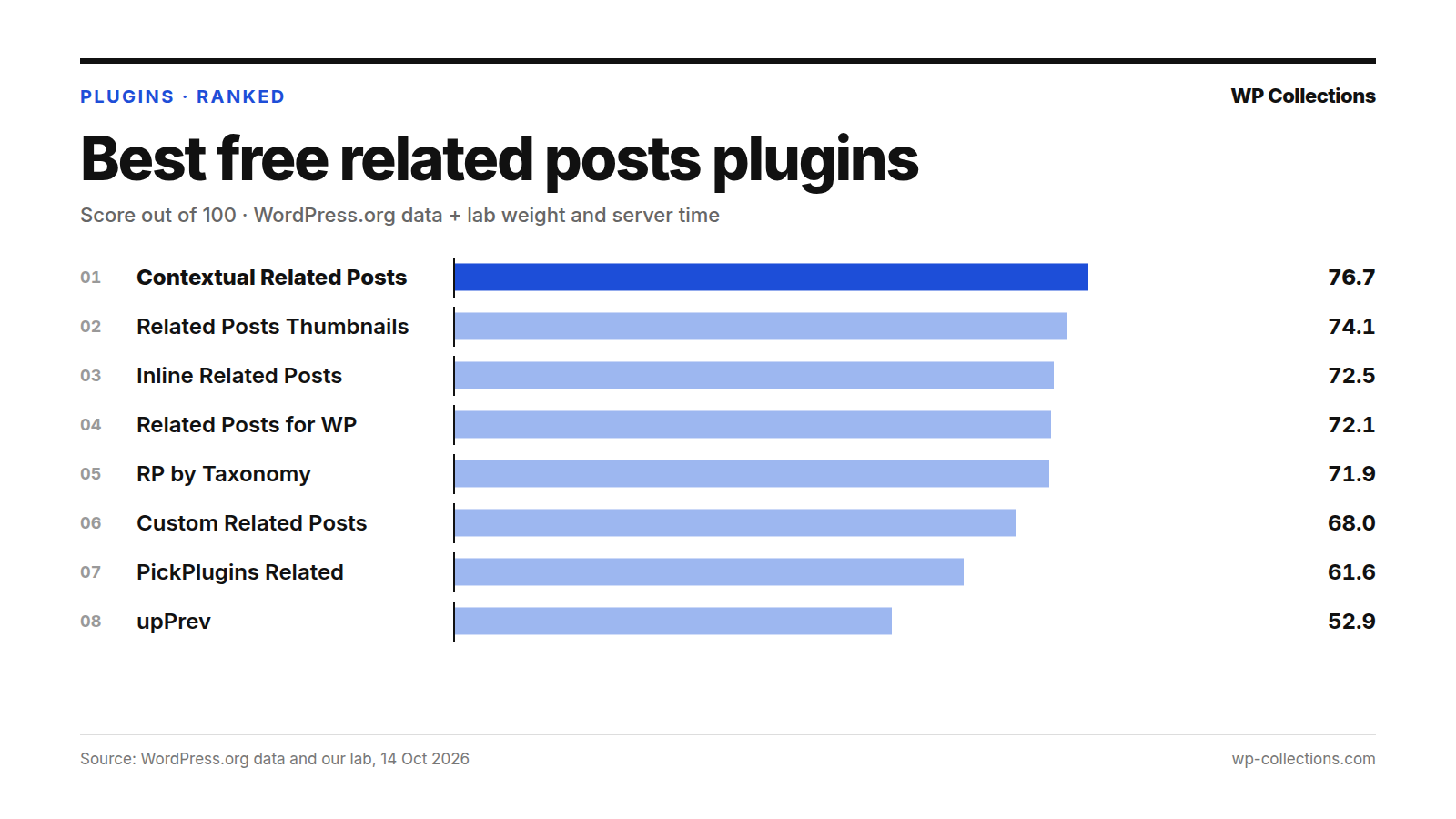
The best free WordPress related posts plugin on our data is Contextual Related Posts, with 76.7 out of 100. Related Posts Thumbnails is second on 74.1 and Inline Related Posts third on 72.5. We scored eight free plugins on their WordPress.org record, the page weight each one added to a post in our lab, and the server time it added.
Contextual Related Posts leads on its record: a 96% rating (201 ratings), 50,000+ installs and an update on 10 October 2026. It was also the only plugin in our test whose default output added images to the page, six thumbnails. It paid for that on the server, +30.7 ms (median), the most of any plugin here. Places three to five sit within 0.6 points of each other, so read those as a group.
Short answer: For related posts with thumbnails that appear with no setup, use Contextual Related Posts. If server time matters more on your hosting, Inline Related Posts (+7.8 ms) and Related Posts Thumbnails (+15.4 ms) also show related posts automatically and added less. To pick related posts yourself, use Custom Related Posts. For a widget or shortcode that matches on categories and tags, use Related Posts by Taxonomy.
Last updated: 14 October 2026. We re-run the numbers every month.
The top 8 at a glance
| # | Plugin | Score | Installs | Rating | Lab: weight, server time | How it shows |
|---|---|---|---|---|---|---|
| 1 | Contextual Related Posts | 76.7 | 50,000+ | 96% | +1.1 KB, +30.7 ms | Automatic; block, widget, shortcode |
| 2 | Related Posts Thumbnails | 74.1 | 20,000+ | 98% | +1.9 KB, +15.4 ms | Automatic; block, widget, shortcode |
| 3 | Inline Related Posts | 72.5 | 100,000+ | 86% | +0.0 KB, +7.8 ms | Automatic, inside the post; shortcode |
| 4 | Related Posts for WordPress | 72.1 | 10,000+ | 92% | +0.2 KB, +13.1 ms | Automatic after a linking run; shortcode, widget |
| 5 | Related Posts by Taxonomy | 71.9 | 10,000+ | 96% | +0.4 KB, +2.4 ms | Widget, shortcode |
| 6 | Custom Related Posts | 68.0 | 3,000+ | 98% | +0.4 KB, +4.0 ms | Manual pick; block, widget, shortcode |
| 7 | Related Posts By PickPlugins | 61.6 | 3,000+ | 92% | +0.0 KB, +5.7 ms | Under the content; shortcode |
| 8 | upPrev | 52.9 | 1,000+ | 92% | +37.6 KB, +9.1 ms | Automatic flyout box |
How we scored them
Each plugin gets a score out of 100. Eighty points come from its WordPress.org record and twenty from our lab, split between page weight and server time:
- WordPress.org record, 80 points: our WordPress.org score out of 100, scaled to 80. That score is Satisfaction 35 (the star rating, blended with 25 imaginary votes at 80% so a handful of reviews cannot carry a plugin), Adoption 25 (active installs on a log scale, 1,000 = 0 and 1,000,000 = full), Maintenance 20 (full marks for an update in the last 30 days, sliding to 0 at 365 days) and Support 20 (the share of the last two months’ support threads marked resolved; fewer than 3 threads earns half marks).
- Page weight, 10 points: 0 KB added earns 10 points and 40 KB or more earns 0.
- Server time, 10 points: 10 ms added or less earns 10 points and 100 ms or more earns 0.
Our lab is a fresh WordPress 7.1.3 install on PHP 8.5 with the Twenty Twenty-Five theme and no other plugins. The test post has about 1,500 words, 8 h2 sections, 3 h3 headings and 3 images, loaded by a logged-out visitor. Weight added is the HTML plus every CSS and JS file the page links, gzipped, minus the same page with no plugin (19.8 KB).
Server time is the median of at least three separate lab runs of each plugin, each run itself a median of 15 requests. A plugin’s first-ever page load can be slow because it builds an index or its tables, which is why we re-test and use the median. Gaps under about 10 ms are within noise.
Every plugin was activated alone with default settings. Some show related posts under each post straight away; others wait for a block, widget or shortcode, or for you to pick posts. For those, the weight we measured is before you place anything. Plugins with no update in 365 days are out of the running. The full method is on how we rank.
1. Contextual Related Posts, 76.7
Contextual Related Posts finds related posts from the current post’s title and content, and can also match on tags, categories and custom fields. Its page calls the default “Activate and Forget”: it shows related posts after the content and in your feed with no template edits. There is also a block, a widget, a [crp] shortcode and a REST API endpoint, and output is cached as visitors browse.
Its page says it creates three MySQL FULLTEXT indices on activation to find matches. In our lab its first measured load added 83.0 ms; the re-tests added 6.2, 30.7, 32.5, 31.8, 9.6 and 21.7 ms. That gives a median of +30.7 ms, worth 7.7 of 10 server points. The spread is wide, so expect your own numbers to vary. Page weight was small, +1.1 KB, even with six thumbnail images in its output.
Its record is the strongest here, 74.1 out of 100: 96% (201 ratings), 50,000+ installs, an update on 10 October 2026, and it had only one support thread in the last two months, which earns half marks for support. Its page also says it collects no personal data and sends nothing to external services. It suits most blogs that want related posts to appear without setup.
2. Related Posts Thumbnails, 74.1
Related Posts Thumbnails Plugin for WordPress (its page also calls it Related Posts by WPBrigade) adds related posts with thumbnails after each post. You can relate posts by categories, tags, both, custom taxonomies or at random, choose “thumbnail” or “medium” image sizes, and turn off the automatic placement in favor of a block, a widget, the [related-posts-thumbnails] shortcode or a PHP tag.
It has the best rating in the group, 98% (233 ratings). In our lab it added 1.9 KB and +15.4 ms (median) across four runs (17.4, 14.9, 12.5 and 16.0 ms), worth 9.5 and 9.4 points. It loses ground on maintenance: last updated 17 July 2026, 89 days before our check (16.5 of 20), and it lists WordPress 7.0.7 as tested. Its 20,000+ installs earn 10.8 of 25.
Its FAQ says it uses the post’s featured image, or the first image in the post when there is none. It suits blogs whose posts have featured images and that want a thumbnail row under each post. It had no support threads in the last two months, which earns half marks for support.
3. Inline Related Posts, 72.5
Inline Related Posts, from Data443, puts related post boxes inside the content rather than after it. Its page says it can place several boxes in every post automatically, detects line breaks so it does not split paragraphs or headings, and offers 20+ style combinations. The [irp] shortcode places a box by hand.
It was among the lightest in our lab: 0.0 KB added with default settings and +7.8 ms (median, within noise) across four runs (8.4, 2.0, 13.8 and 7.1 ms), full marks on both. It has the most installs of the eight, 100,000+, but the lowest rating, 86% (77 ratings), and it had only two support threads in the last two months, which earns half marks for support. It was updated 3 August 2026 and lists WordPress 7.0.7 as tested.
It suits sites that want to keep readers moving in the middle of a post. The rating is the caution: 86% is the lowest of the eight.
4. Related Posts for WordPress, 72.1
Related Posts for WordPress links posts to each other in a background run: after activation you choose how many related posts each post gets and press Start. It keeps its own database tables, so showing related posts only reads the links already stored. You can edit the links by hand, and there is a [rp4wp] shortcode and a widget. Its page says related posts are then added below your posts automatically.
Our lab activated it with default settings, before any linking run, so its +0.2 KB is measured before it shows anything. Server time varied widely: +13.1 ms median across six runs (25.6, 0.8, 13.0, 1.6, 13.1 and 17.8 ms). It was updated 11 October 2026 and is rated 92% (325 ratings), but 10,000+ installs earn 8.3 of 25 for adoption.
It suits large archives, since the matching runs in the background rather than on each page view. It requires PHP 8.0, and its FAQ says multisite needs the premium version.
5. Related Posts by Taxonomy, 71.9
Related Posts by Taxonomy finds the posts with the most terms in common (categories, tags or other taxonomies) and shows them with a widget or the [related_posts_by_tax] shortcode, as thumbnails, links, excerpts or full posts. Its page lists automatic display after the content, and its FAQ points to its documentation for setting that up.
With default settings it shows nothing until you place it, so its 0.4 KB was measured before you do; server time was +2.4 ms (median, within noise). It is rated 96% (77 ratings), was updated 21 August 2026, and has 10,000+ installs. Its FAQ says it does not track user data or use cookies.
It suits developers and careful site owners. Its page says the persistent cache, REST API and Ajax loading are opt-in and assume some familiarity with WordPress hooks.
6. Custom Related Posts, 68.0
Custom Related Posts is for picking related posts by hand. On the post edit screen you search for posts and link them, one way or both ways, then show the list with a shortcode, widget or block, optionally with featured images.
Nothing shows until you place it, so its 0.4 KB and +4.0 ms (median, within noise) were measured before you do. It is rated 98% (46 ratings) and was updated 19 August 2026, but 3,000+ installs earn 4.0 of 25 for adoption.
It suits editors who want full control and will pick links for each post. On a large archive, that is a lot of manual work.
7. Related Posts By PickPlugins, 61.6
Related Posts By PickPlugins shows related posts under the content of posts, pages or custom post types, and can also show them under excerpts on archive pages or after a chosen paragraph. It matches on category, tags and custom taxonomies, lets you pick posts by hand, offers grid, slider and list layouts, and can track clicks on related posts. The [related_post] shortcode places it anywhere.
It added 0.0 KB and +5.7 ms (median, within noise) with default settings, across four runs (13.4, 1.8, -0.1 and 9.6 ms). Adoption and maintenance hold it back: 3,000+ installs (4.0 of 25), and a last update on 8 June 2026, 128 days before our check (14.1 of 20). It is rated 92% (39 ratings) and lists WordPress 7.0.7 as tested.
8. upPrev, 52.9
upPrev shows an animated flyout or fade-in box when a reader nears the bottom of a post. It can suggest the previous post, one in the same category or tag, a random post, or related posts through YARPP.
It is the heaviest plugin here: 37.6 KB, almost twice the 19.8 KB test page, worth 0.6 of 10. Server time was +9.1 ms (median, within noise) across four runs (18.1, 2.9, 5.6 and 12.7 ms). Its 1,000+ installs score 0 for adoption, and it resolved 1 of 3 recent support threads (6.7 of 20). It is rated 92% (126 ratings) and was updated 24 September 2026.
One of its modes depends on YARPP, which is out of the running here (see below).
Every plugin we measured
| # | Plugin | Score | WordPress.org score | Weight added (points /10) | Server time (points /10) | Updated |
|---|---|---|---|---|---|---|
| 1 | Contextual Related Posts | 76.7 | 74.1 | +1.1 KB (9.7/10) | +30.7 ms (7.7/10) | 10 Oct 2026 |
| 2 | Related Posts Thumbnails | 74.1 | 69.0 | +1.9 KB (9.5/10) | +15.4 ms (9.4/10) | 17 Jul 2026 |
| 3 | Inline Related Posts | 72.5 | 65.6 | +0.0 KB (10.0/10) | +7.8 ms (10.0/10) | 3 Aug 2026 |
| 4 | Related Posts for WordPress | 72.1 | 65.6 | +0.2 KB (9.9/10) | +13.1 ms (9.7/10) | 11 Oct 2026 |
| 5 | Related Posts by Taxonomy | 71.9 | 65.0 | +0.4 KB (9.9/10) | +2.4 ms (10.0/10) | 21 Aug 2026 |
| 6 | Custom Related Posts | 68.0 | 60.1 | +0.4 KB (9.9/10) | +4.0 ms (10.0/10) | 19 Aug 2026 |
| 7 | Related Posts By PickPlugins | 61.6 | 52.0 | +0.0 KB (10.0/10) | +5.7 ms (10.0/10) | 8 Jun 2026 |
| 8 | upPrev | 52.9 | 52.9 | +37.6 KB (0.6/10) | +9.1 ms (10.0/10) | 24 Sep 2026 |
| Out | YARPP | – | 57.9 | +0.3 KB | +6.6 ms | 11 Nov 2024 |
What we left out, and why
One related posts plugin is out of the running because it has not been updated in over a year. Our rule drops any plugin with no update in 365 days.
- YARPP – Yet Another Related Posts Plugin: last updated 11 November 2024, 702 days before our check. It has 100,000+ installs and a 96% rating (1,164 ratings), and lists WordPress 6.7.10 as the latest version tested.
Many lists still put YARPP first, and its record explains why: it has more ratings than any plugin here. In our lab it was light too, +0.3 KB with default settings. But its page still calls it “professionally maintained and actively supported with regular updates”, and its last release was on 11 November 2024. If you run it, check its page for a new release before you rely on it.
How to choose the best free WordPress related posts plugin
- Decide where the links go: after the post (Contextual Related Posts, Related Posts Thumbnails), inside the post (Inline Related Posts), in a flyout box (upPrev), or in a sidebar widget.
- Decide who picks them. Automatic matching suits big archives; Custom Related Posts suits a small site where you want every link chosen by hand.
- If your posts have featured images, a thumbnail plugin will look better. Check that your older posts have one before you switch it on.
- On shared hosting, weigh server time: the medians here range from +2.4 ms to +30.7 ms. A page cache hides most of it for logged-out visitors.
- After activating, open a few posts as a logged-out visitor and check the related posts actually make sense for your content.
Questions people ask
Which is the best free WordPress related posts plugin?
On our data, Contextual Related Posts, with 76.7 out of 100. Related Posts Thumbnails (74.1) and Inline Related Posts (72.5) follow.
Do related posts plugins slow down WordPress?
A little, and it varies. With default settings, the plugins we tested added between 0.0 KB and 37.6 KB of page weight, and between 2.4 ms and 30.7 ms of server time (medians). upPrev was the heaviest page; Contextual Related Posts the slowest on the server.
Why did Contextual Related Posts take longer on its first load?
Its page says it creates three MySQL FULLTEXT indices on activation. Its first measured load in our lab added 83.0 ms; the median of all seven runs was 30.7 ms. That is why we re-test and score the median.
Is YARPP still maintained?
Its last update on WordPress.org was on 11 November 2024, 702 days before our check, so it is out of the running under our 365-day rule.
Can I choose related posts by hand?
Yes. Custom Related Posts is built for that. Related Posts for WordPress lets you edit its automatic links, and Related Posts By PickPlugins has a manual post selection.