The 12 Best Free WordPress Backup Plugins in 2026, Ranked by Data
Duplicator is the best free WordPress backup plugin on our data (93.2/100), just ahead of All-in-One WP Migration (92.2) and WPvivid (91.6).
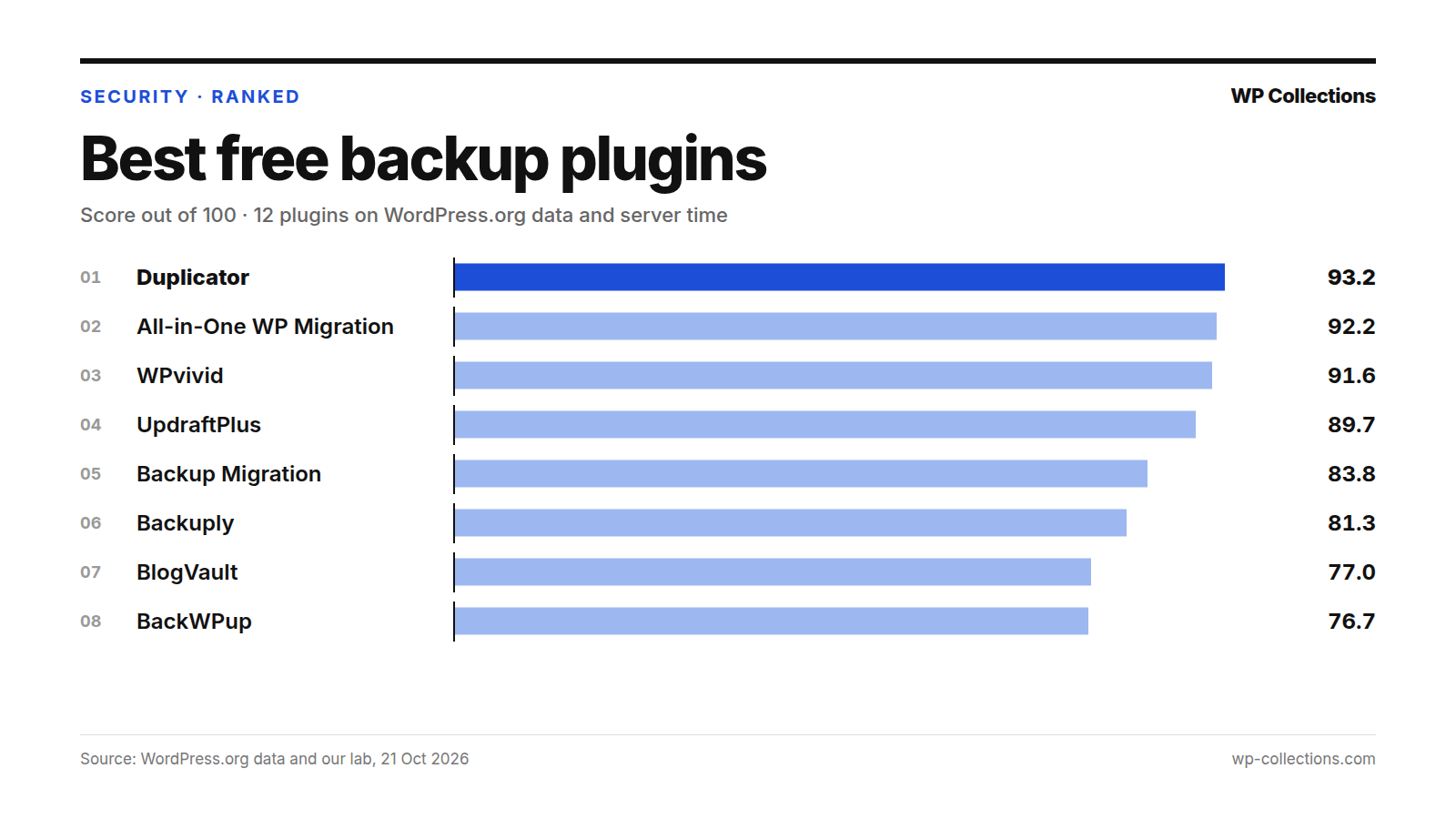
The best free WordPress backup plugin on our data is Duplicator, with 93.2 out of 100. All-in-One WP Migration is second on 92.2 and WPvivid third on 91.6, so the top three sit within 1.6 points. We scored 12 free backup plugins on their WordPress.org record and on the server time each one added to a page in our lab.
None added weight to the page, so server time settled close records: WPvivid is second on WordPress.org data alone, but its +35.2 ms per page puts it below All-in-One WP Migration (+11.7 ms). Read the free features too: the top two list scheduled backups as paid, while WPvivid, UpdraftPlus and Backup Migration schedule backups to cloud storage for free.
Short answer: For scheduled backups to your own cloud storage from a free plugin, install WPvivid or UpdraftPlus. To move a site to a new host or take a one-off full backup, use Duplicator or All-in-One WP Migration. For scheduled backups with almost no server time, try Backup Migration, whose free version stops at 4GB backups.
Last updated: 21 October 2026. We re-run the numbers every month.
The top 12 at a glance
| # | Plugin | Score | Installs | Rating | Server time | Updated |
|---|---|---|---|---|---|---|
| 1 | Duplicator | 93.2 | 1M+ | 98% | +42.0 ms | 14 Oct 2026 |
| 2 | All-in-One WP Migration | 92.2 | 5M+ | 90% | +11.7 ms | 7 Oct 2026 |
| 3 | WPvivid | 91.6 | 900,000+ | 98% | +35.2 ms | 28 Sep 2026 |
| 4 | UpdraftPlus | 89.7 | 4M+ | 96% | +16.1 ms | 19 Oct 2026 |
| 5 | Backup Migration | 83.8 | 80,000+ | 98% | +4.0 ms | 11 Aug 2026 |
| 6 | Backuply | 81.3 | 600,000+ | 90% | +0.8 ms | 1 Oct 2026 |
| 7 | BlogVault | 77.0 | 80,000+ | 92% | +5.1 ms | 17 Sep 2026 |
| 8 | BackWPup | 76.7 | 400,000+ | 80% | +32.7 ms | 14 Oct 2026 |
| 9 | WP Database Backup | 68.9 | 20,000+ | 90% | +11.3 ms | 24 Aug 2026 |
| 10 | Total Upkeep | 68.5 | 50,000+ | 96% | +3.3 ms | 18 Aug 2026 |
| 11 | Jetpack VaultPress Backup | 65.5 | 20,000+ | 90% | +18.3 ms | 11 Aug 2026 |
| 12 | XCloner | 58.3 | 10,000+ | 84% | +13.6 ms | 26 May 2026 |
How we scored them
A backup plugin works when a backup runs. The rest of the time it is still loaded on every page view, doing nothing for visitors. Our test post uses no plugin feature, so the lab number is that idle cost.
No plugin added page weight: 0.0 KB for 11 of the 12 and 0.1 KB for Backup Migration. We show weight in the full table but do not score it. The score:
- WordPress.org record, 85 points: our usual score out of 100, scaled to 85. Satisfaction 35 (rating blended with 25 imaginary votes at 80%), Adoption 25 (installs, log scale, 1,000,000 = full), Maintenance 20 (full within 30 days of an update, zero at 365), Support 20 (share of the last two months’ threads resolved; under 3 threads = half marks).
- Server time, 15 points: 10 ms or less added = 15, 100 ms or more = 0, in a straight line between.
Lab: fresh WordPress 7.1.3, PHP 8.5, Twenty Twenty-Five. Each plugin was installed from WordPress.org on 21 October 2026, activated alone with default settings and timed on a 1,500-word post for a logged-out visitor: the median of 15 requests, minus the same page with no plugin, in three separate runs; we use the median run.
The no-plugin page itself ranged from 60.1 to 66.8 ms between runs, so we do not rank on gaps under about 15 ms. We did not measure a backup while it runs. The full method is on how we rank.
1. Duplicator, 93.2
Duplicator – Backups & Migration Plugin – Cloud Backups, Scheduled Backups, & More packages your files and database into one archive you can download, restore or install elsewhere. Its page says the free plugin includes backups of any size, AES-256 encrypted archives, 1-click restore from the dashboard, and off-site copies to Duplicator Cloud, the developer’s own storage, which you connect with an account. A migration wizard is included.
Despite the title, scheduled backups are a Pro feature, as are other destinations such as Dropbox, Google Drive, OneDrive, Amazon S3 and FTP/SFTP. The free plugin also does not support multisite.
Its WordPress.org record is the best here, 98.2: 98% (4,940 ratings), 1M+ installs and all 20 recent threads resolved. Server time is the cost, +42.0 ms, the most of the 12, worth 9.7 of 15. It suits one-off backups and moving a site.
2. All-in-One WP Migration, 92.2
All-in-One WP Migration and Backup exports the whole site, database, media, themes and plugins, to a single .wpress file, and its page says the free plugin backs up and exports sites of any size. Restoring is free: download the file and upload it on the Import screen. Your host’s upload limit decides how large a file that accepts; one-click restore from the Backups page, and uploads past that limit, come with the paid Unlimited Extension.
Cloud destinations, scheduled backups and multisite are premium extensions.
It has the most installs here, 5M+, and resolved 7 of 7 recent threads. Its rating, 90% (7,672 ratings), is the lowest of the top four. Its +11.7 ms, worth 14.7 of 15, lifts it above WPvivid.
3. WPvivid, 91.6
WPvivid – Backup, Migration & Staging has the fullest free feature list of the top three. It schedules backups every 12 hours, daily, weekly, fortnightly or monthly, and sends them to Dropbox, Google Drive, Amazon S3, Microsoft OneDrive, DigitalOcean Spaces, FTP or SFTP; its FAQ says “all the cloud access is free”. Restore is one click, migration to a new domain is free, and it can build a staging site in a subdirectory.
Its Pro list adds incremental backups, multisite backups and “Restore remote backups”.
On WordPress.org data alone it is second, 95.1: 98% (1,562 ratings), 900,000+ installs, 7 of 8 threads resolved. +35.2 ms of server time, worth 10.8 of 15, puts it third. For free scheduled off-site backups, it has the strongest record here.
4. UpdraftPlus, 89.7
UpdraftPlus: WP Backup & Migration Plugin schedules backups every 2, 4, 8 or 12 hours, daily, weekly, fortnightly or monthly. The free version sends them to Dropbox, Google Drive, Amazon S3 (or compatible), Rackspace Cloud, FTP, DreamObjects, OpenStack Swift or email. You restore by choosing which parts come back, such as plugins, themes or the database. Free migration means downloading the backup from one site and uploading it to the other.
Premium adds backups before updates, incremental backups, more destinations including OneDrive and SFTP, multisite and database encryption.
It is the most-rated backup plugin, 96% from 8,685 ratings, with 4M+ installs and an update on 19 October 2026. Support costs it: 26 of 41 recent threads resolved, 12.7 of 20. Its +16.1 ms is within noise of All-in-One WP Migration’s.
5. Backup Migration, 83.8
Backup Migration, which its page also calls BackupBliss, makes a full backup with one click and runs automatic backups daily, weekly or monthly. Free destinations are Google Drive, Dropbox, OneDrive, Amazon S3, Wasabi, pCloud, SFTP, FTP and the developer’s own storage with 1GB of free space. You restore from its Manage & Restore Backup(s) tab.
Its page states the limit plainly: the free version is limited to backups of 4GB, “due to native WordPress ZIP limitations”.
It is rated 98% (1,338 ratings) and added +4.0 ms, within noise. Its 80,000+ installs and 8 of 11 threads resolved keep it below the top four.
6. Backuply, 81.3
Backuply – Backup, Restore, Migrate and Clone lists local backups, backups to FTP and Google Drive, one-click restore, migration and database-only backups as free features. Automatic backups on a schedule, and the other destinations (Dropbox, OneDrive, Amazon S3, SFTP, FTPS, WebDAV, pCloud), are in its Premium list.
Its 90% rating rests on 135 ratings, few for 600,000+ installs, and the forum had only 2 recent threads, so support gets half marks. Its server time is noisy: runs of +23.3, +0.8 and -2.2 ms, median +0.8. Scored on its slowest run instead, it would still be sixth.
7. BlogVault, 77.0
BlogVault Backup & Staging works differently: backups are processed on BlogVault’s servers and stored off-site on its cloud, daily and incremental, with up to 90 days of history, one-click restore, staging and migration. Its FAQ is direct: “BlogVault is a paid backup service”, with a 7-day free trial, and the plugin needs a BlogVault account.
It added +5.1 ms, within noise, and is rated 92% (332 ratings). Server time moves it above BackWPup, which is ahead on WordPress.org data alone.
8. BackWPup, 76.7
BackWPup – WordPress Backup & Restore Plugin schedules backups hourly, daily, weekly or monthly and can send one backup to several destinations at once, each with its own retention. The free list: your server, Dropbox, FTP, Microsoft Azure, Amazon S3 and compatible storage, SugarSync and Rackspace Cloud Files.
The free version restores backups you upload manually; restoring straight from cloud storage, migration and encryption are Pro.
It resolved 17 of 19 recent threads, but its rating, 80% (1,323 ratings), is the lowest of the 12, and its +32.7 ms puts it in the slow group with Duplicator and WPvivid, worth 11.2 of 15.
9. WP Database Backup, 68.9
WP Database Backup – Unlimited Database & Files Backup by Backup for WP centers on the database: one-click database backups and restores, automatic backups on a repeating schedule, and copies to Dropbox, Google Drive, Amazon S3, FTP, sFTP, Backblaze or email.
It had no support threads in the last two months, so support gets half marks, and 20,000+ installs earn 10.8 of 25. It added +11.3 ms.
10. Total Upkeep, 68.5
Total Upkeep – WordPress Backup Plugin plus Restore & Migrate by BoldGrid runs automated backups, stores remote copies over FTP/SFTP in the free version (Amazon S3 and Google Drive are Premium) and restores with one click. It can also back up before updates and roll back if one fails.
It is rated 96% (442 ratings) and added +3.3 ms. Support sinks it: none of its 3 recent threads was resolved, 0 of 20.
11. Jetpack VaultPress Backup, 65.5
Jetpack VaultPress Backup gives cloud backups and one-click restores without the full Jetpack plugin. Its page says: “To use this plugin you will need to have a paid Jetpack plan that includes Backup.” Backups are stored on Jetpack’s servers, daily or in real time depending on the plan; it does not save to Google Drive or Dropbox and does not support multisite.
It has 20,000+ installs, 90% from 35 ratings, and added +18.3 ms.
12. XCloner, 58.3
Backup, Restore and Migrate your sites with XCloner schedules backups hourly, daily, weekly or monthly and sends them to FTP, SFTP, Dropbox, Amazon S3, Google Drive, WebDAV, Backblaze or Azure. It offers differential backups, AES-128-CBC encrypted archives and a restore script for moving to another server.
Maintenance holds it back: last updated 26 May 2026, 148 days before our data pull, and tested to WordPress 7.0.7. Its runs were +23.3, +12.3 and +13.6 ms, median +13.6.
Every plugin we measured
| # | Plugin | Score | WordPress.org /100 | Server time /15 | Server time runs (ms) | Weight |
|---|---|---|---|---|---|---|
| 1 | Duplicator | 93.2 | 98.2 | 9.7 | +42.4 / +42.0 / +39.0 | 0.0 KB |
| 2 | All-in-One WP Migration | 92.2 | 91.2 | 14.7 | +12.7 / +9.5 / +11.7 | 0.0 KB |
| 3 | WPvivid | 91.6 | 95.1 | 10.8 | +39.0 / +35.2 / +33.2 | 0.0 KB |
| 4 | UpdraftPlus | 89.7 | 89.1 | 14.0 | +15.7 / +16.1 / +18.4 | 0.0 KB |
| 5 | Backup Migration | 83.8 | 80.9 | 15.0 | +7.8 / +4.0 / +3.4 | 0.1 KB |
| 6 | Backuply | 81.3 | 78.0 | 15.0 | +23.3 / +0.8 / -2.2 | 0.0 KB |
| 7 | BlogVault | 77.0 | 72.9 | 15.0 | +5.1 / +5.2 / +4.4 | 0.0 KB |
| 8 | BackWPup | 76.7 | 77.1 | 11.2 | +32.7 / +29.5 / +36.5 | 0.0 KB |
| 9 | WP Database Backup | 68.9 | 63.7 | 14.8 | +13.6 / +5.4 / +11.3 | 0.0 KB |
| 10 | Total Upkeep | 68.5 | 62.9 | 15.0 | +4.3 / +3.3 / -3.6 | 0.0 KB |
| 11 | Jetpack VaultPress Backup | 65.5 | 61.0 | 13.6 | +22.2 / +18.3 / +15.1 | 0.0 KB |
| 12 | XCloner | 58.3 | 51.7 | 14.4 | +23.3 / +12.3 / +13.6 | 0.0 KB |
| – | BackUpWordPress | Out | 55.4 | – | Not tested | – |
What we left out, and why
BackUpWordPress is out of the running: no update since 24 April 2024, 910 days before our data pull, past our 365-day cut-off. It still has 80,000+ installs and a 94% rating (1,373 ratings), and many lists still recommend it. Its page says it is under new ownership with occasional updates, its paid Dropbox and Google Drive add-ons are no longer sold, and it points users to UpdraftPlus for cloud backups. Restoring is manual.
Two plugins stay in the ranking with a warning. BlogVault is a paid service with a 7-day free trial, and Jetpack VaultPress Backup needs a paid Jetpack plan that includes Backup. Both install free from WordPress.org, so we scored them on the same numbers; skip them if you want backups without paying.
What a backup plan needs
A backup is worth what you can restore from it. Three habits matter more than which plugin you pick:
- An off-site copy. A backup kept only on your own server goes down with that server. Send copies to cloud storage or a remote server; the free versions of WPvivid, UpdraftPlus, Backup Migration and BackWPup can.
- A schedule. Back up as often as the site changes, so a shop or busy blog more often than a site edited once a month. Duplicator, All-in-One WP Migration and Backuply schedule backups only in their paid versions.
- A tested restore. Restore a backup to a staging copy or spare install before you need it. That shows whether the file is complete and whether your host’s limits get in the way.
To keep trouble out in the first place, see the best free WordPress security plugins.
How to choose the best free WordPress backup plugin
- Decide the job: regular backups that protect the site, or a one-off copy to move it.
- For scheduled off-site backups without paying, pick WPvivid or UpdraftPlus. Check your storage is on the free list: OneDrive and DigitalOcean Spaces are free in WPvivid, while OneDrive is Premium in UpdraftPlus.
- To move a site, use Duplicator or All-in-One WP Migration. With All-in-One WP Migration, check the upload limit on the new host’s Import screen first.
- Check the stated limits: Backup Migration’s free version stops at 4GB, Duplicator’s free version does not support multisite, and BlogVault and Jetpack VaultPress Backup need a paid plan.
- Run a first backup, confirm it reached your storage, then restore it on a staging copy.
- If your pages are already slow, time a logged-out page with the plugin on and off.
Questions people ask
Which is the best free WordPress backup plugin?
On our data, Duplicator, with 93.2 out of 100, just ahead of All-in-One WP Migration (92.2) and WPvivid (91.6). If you want scheduled backups to cloud storage without paying, WPvivid or UpdraftPlus (89.7) is the better pick, since the top two list scheduling as a paid feature.
Is UpdraftPlus still the best backup plugin?
It is the most-rated, 96% from 8,685 ratings, and fourth on our score, 89.7. It lost ground on support: 26 of 41 recent threads resolved, against 20 of 20 for Duplicator. Its free version still schedules backups to Dropbox, Google Drive, Amazon S3 and more.
Do backup plugins slow down WordPress?
Not the page visitors download: none added weight. Server time on an ordinary page, with the plugin idle, ran from +0.8 to +42.0 ms. Duplicator (+42.0 ms), WPvivid (+35.2 ms) and BackWPup (+32.7 ms) added the most; Backuply, Total Upkeep, Backup Migration and BlogVault stayed within noise. We did not measure a backup while it runs.
Can I restore a backup for free?
With most of them, yes. Duplicator, WPvivid, UpdraftPlus, Backup Migration, Backuply and Total Upkeep restore from the dashboard in their free versions. All-in-One WP Migration restores for free through its Import screen, up to your host’s upload limit, and BackWPup’s free version restores backups you upload manually.
Should I still use BackUpWordPress?
It has not been updated since 24 April 2024, 910 days before our data pull, so it is out of our ranking. Its page says the paid cloud add-ons are no longer sold, so backups stay on your server or arrive by email. WPvivid or UpdraftPlus sends copies off-site on a schedule for free.