The 10 Best Free WordPress Statistics Plugins in 2026, Tested
Independent Analytics (87.0) and Burst Statistics (86.7) are tied as the best free WordPress statistics plugin on our data; Koko Analytics is third on 82.4.
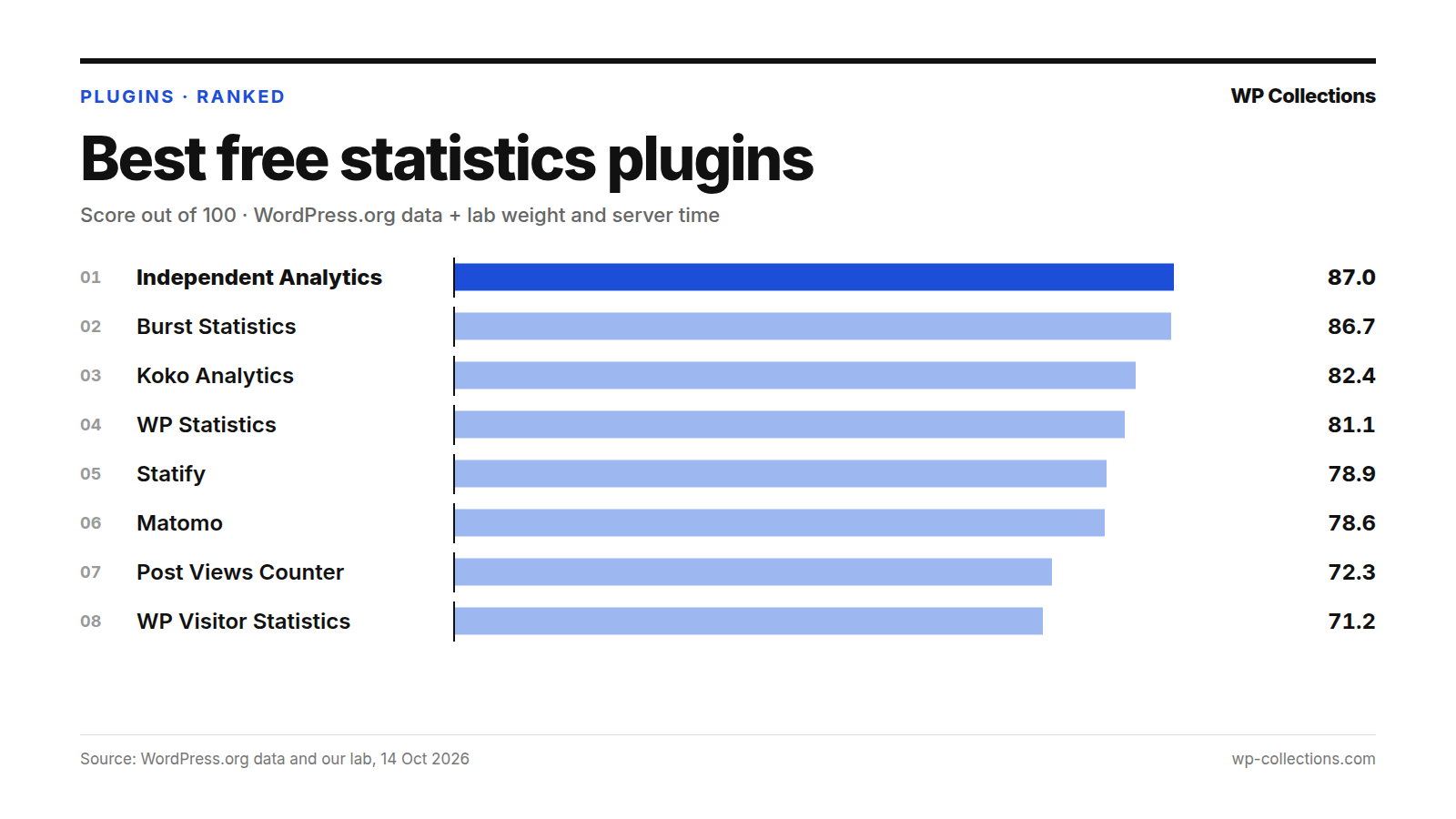
The best free WordPress statistics plugin on our data is a tie: Independent Analytics scores 87.0 out of 100 and Burst Statistics 86.7. Koko Analytics is third on 82.4. We scored ten free plugins that count visitors on your own site on their WordPress.org record, the page weight each one added in our lab, and the server time it added.
A 0.3-point gap does not make a winner, so choose between the top two on what you value. Burst Statistics has the better WordPress.org record, 89.4 against 84.8, and resolved 17 of 18 recent support threads. Independent Analytics is lighter on the page: it added 2.3 KB to our test post, where Burst added 19.3 KB. On server time they are level: +11.4 ms for Independent Analytics and +6.7 ms for Burst, a gap within noise.
Short answer: For a light page and cookieless analytics with no setup, use Independent Analytics or Koko Analytics (0.9 KB added). For the best WordPress.org record, goal tracking and email reports, use Burst Statistics. For the longest feature list on your own server, Matomo. To count views per post and show them on the site, Post Views Counter.
Last updated: 14 October 2026. We re-run the numbers every month.
The top 10 at a glance
| # | Plugin | Score | Installs | Rating | Lab: weight, server time | Updated |
|---|---|---|---|---|---|---|
| 1 | Independent Analytics | 87.0 | 100,000+ | 96% | +2.3 KB, +11.4 ms | 20 Aug 2026 |
| 2 | Burst Statistics | 86.7 | 200,000+ | 98% | +19.3 KB, +6.7 ms | 28 Sep 2026 |
| 3 | Koko Analytics | 82.4 | 60,000+ | 100% | +0.9 KB, +4.7 ms | 24 Sep 2026 |
| 4 | WP Statistics | 81.1 | 500,000+ | 82% | +3.3 KB, +13.1 ms | 14 Oct 2026 |
| 5 | Statify | 78.9 | 100,000+ | 96% | +0.0 KB, +6.8 ms | 20 Sep 2026 |
| 6 | Matomo | 78.6 | 100,000+ | 92% | +0.0 KB, +10.9 ms | 15 Sep 2026 |
| 7 | Post Views Counter | 72.3 | 100,000+ | 98% | +1.0 KB, +38.8 ms | 8 Oct 2026 |
| 8 | WP Visitor Statistics | 71.2 | 20,000+ | 90% | +2.4 KB, +17.8 ms | 1 Oct 2026 |
| 9 | SlimStat Analytics | 62.1 | 70,000+ | 96% | +27.5 KB, +12.4 ms | 24 Jun 2026 |
| 10 | Visitor Traffic Real Time Statistics | 57.4 | 30,000+ | 82% | +79.3 KB, +25.3 ms | 1 Oct 2026 |
How we scored them
This list covers plugins that count visitors on your own site and keep the data in your WordPress database, not plugins that connect WordPress to Google Analytics. Each plugin gets a score out of 100:
- WordPress.org record, 80 points: our WordPress.org score out of 100, scaled to 80. That score is Satisfaction 35 (the star rating, blended with 25 imaginary votes at 80% so a handful of reviews cannot carry a plugin), Adoption 25 (active installs on a log scale, 1,000 = 0 and 1,000,000 = full), Maintenance 20 (full marks for an update in the last 30 days, sliding to 0 at 365 days) and Support 20 (the share of the last two months’ support threads marked resolved; fewer than 3 threads earns half marks).
- Page weight, 10 points: 0 KB added earns 10 points and 40 KB or more earns 0.
- Server time, 10 points: 10 ms added or less earns 10 points and 100 ms or more earns 0.
Our lab is a fresh WordPress 7.1.3 install on PHP 8.5 with the Twenty Twenty-Five theme and no other plugins. The test post has about 1,500 words, 8 h2 sections, 3 h3 headings and 3 images, loaded by a logged-out visitor. Weight added is the HTML plus every CSS and JS file the page links, gzipped, minus the same page with no plugin (19.8 KB).
Server time is the median of at least three separate lab runs of each plugin, each run itself a median of 15 requests. A statistics plugin’s first page load can be slow while it creates its tables, which is why we re-test and use the median. Gaps under about 10 ms are within noise. Every plugin was activated alone with default settings; plugins with no update in 365 days are out of the running. The full method is on how we rank.
1. Independent Analytics, 87.0
Independent Analytics – WordPress Analytics Plugin starts tracking as soon as it is activated and shows reports inside the WordPress admin: views, visitors, sessions, bounce rate, session duration, referrers, countries and cities, and devices. Its page says it does not use cookies, store personal data or communicate with external servers, and that all data is stored in your WordPress database.
In our lab it added 2.3 KB to the page, worth 9.4 of 10. Its very first load added 102.5 ms while it set itself up; the re-tests added 8.6, 12.5, 11.4 and 7.3 ms, so its median is +11.4 ms and it keeps 9.8 of 10 server points. On WordPress.org it is rated 96% (166 ratings) and has 100,000+ installs, and it resolved 6 of 6 recent support threads (20.0 of 20).
It suits bloggers who want plain numbers with no setup. Its soft spot on the record is maintenance: last updated 20 August 2026, 55 days before our check (18.5 of 20). It requires PHP 8.0.30.
2. Burst Statistics, 86.7
Burst Statistics – Simple WordPress Analytics (Google Analytics Alternative) shows visitors, sessions, pageviews, bounce rate, top pages and referrers in one dashboard, with real-time visitors, goal tracking for views, clicks and WordPress hooks, and weekly or monthly email reports. Its page says all statistics are stored in your WordPress database and its tracking script is under 4 KB. Its FAQ says it uses cookies by default, with a cookieless option you can switch on.
It has the best WordPress.org record in the list, 89.4: 98% (186 ratings), 200,000+ installs, an update on 28 September 2026, and it resolved 17 of 18 recent support threads (18.9 of 20). The page is where it loses: +19.3 KB in our lab, which nearly doubles our 19.8 KB test page and leaves 5.2 of 10 weight points. Server time was +6.7 ms (median, within noise) across three runs (6.7, -2.6 and 12.3 ms), worth 10.0 of 10.
Our first pass of Burst timed out, so its server figure comes from the re-tests. It suits sites that want goals and email reports in the free version and can carry the extra weight.
3. Koko Analytics, 82.4
Koko Analytics – Privacy-Friendly WordPress Analytics shows pageviews, visitors, top pages and referrers in the WordPress dashboard. Its page says it can be used without cookies, processes and stores no personal data, adds less than 1 kilobyte to your pages, and bypasses WordPress entirely for its collection endpoint. It has blocks for a pageview count and most-viewed pages.
Our lab matches the claim: +0.9 KB added. Server time was +4.7 ms (median, within noise) across four runs (8.0, 5.0, 1.1 and 4.4 ms). It has the only 100% rating in the list, from 244 ratings. Adoption (60,000+ installs, 14.8 of 25) and support (only one support thread in the last two months, half marks) keep it third.
It suits sites that want the smallest footprint. Country, browser and device reports are Pro features, per its page.
4. WP Statistics, 81.1
WP Statistics – Simple, privacy-friendly Google Analytics alternative reports visitors, referrers (including search engines, social media and source categories), content and category stats, authors, countries, cities, devices, live online users and email reports. Its page says it does not use cookies, does not store personally identifiable information by default, and is GDPR compliant by default.
It was updated on 14 October 2026, the day of our check, and has the most installs of the ten, 500,000+. Its rating holds it back: 82% (759 ratings), joint lowest here. In our lab it added 3.3 KB. Server time varied across five runs (36.3, 13.1, 0.5, 11.6 and 22.1 ms), for a median of +13.1 ms.
It suits sites that want the widest set of free reports inside WordPress.
5. Statify, 78.9
Statify counts page views, not visitors. Its page says it uses neither cookies nor a third party, and stores views in a local table of four fields: ID, date, source and target. A dashboard widget shows a chart, top referrers and top target pages. Data is kept for two weeks by default.
It added 0.0 KB to our page with default settings, and +6.8 ms (median, within noise) across four runs (10.2, 4.6, 6.3 and 7.3 ms). Its page says JavaScript tracking is optional and makes counting reliable on cached pages. It is rated 96% (51 ratings), has 100,000+ installs and was updated 20 September 2026.
It suits sites that want one number and a referrer list.
6. Matomo, 78.6
Matomo Analytics – Powerful, Privacy-First Insights for WordPress runs the Matomo analytics platform inside WordPress: dashboards, segmentation, real-time reports, campaign and ecommerce tracking, a Tag Manager and geolocation reports. Its page says all data is stored in your WordPress database and not sent to any third party, and it can import history from Google Analytics or WP Statistics.
Its 0.0 KB in our lab needs a note. Its installation steps say that once installed, you go to Matomo Analytics and click “Activate tracking” on the “Get started” page. We tested with default settings, so tracking was not yet on: the weight and the +10.9 ms (median) server time across four runs (21.1, 7.4, 2.9 and 14.4 ms) are from before tracking, and its 10.0 of 10 weight points are best read as an upper bound. Its page also says running Matomo “can use significant resources”, with an additional request for each page view.
It is rated 92% (178 ratings), has 100,000+ installs, was updated 15 September 2026, and lists WordPress 7.1.0 as tested. For high-traffic sites, its page recommends Matomo On-Premise or Matomo Cloud instead. It suits owners who want a full analytics suite and have the server headroom.
7. Post Views Counter, 72.3
Post Views Counter counts views of posts, pages and other content, plus site-wide visits, and shows the counts on your site automatically or with a block, shortcode or PHP function. It adds a sortable views column, a top posts dashboard widget and a weekly email summary.
It has the most ratings in the list, 98% (1,233 ratings), and was updated 8 October 2026. Two numbers pull it down. It added the most server time of the ten, +38.8 ms across four runs (57.8, 42.9, 13.4 and 34.6 ms), worth 6.8 of 10. And none of its 3 recent support threads were marked resolved. Page weight was small, +1.0 KB.
Its FAQ says it uses a first-party cookie to apply its count interval. It suits blogs that want view counts on posts more than a traffic dashboard.
8. WP Visitor Statistics, 71.2
WP Visitor Statistics (Real Time Traffic) tracks visits, visitors, browsers, operating systems and country (GeoIP), with real-time statistics, search engine queries, IP hashing and automatic pruning of old data. Widgets, shortcodes, email reports and city-level locations are listed as Pro features.
In our lab it added 2.4 KB and +17.8 ms (median) across four runs (28.9, 16.0, 18.6 and 16.9 ms). It is rated 90% (156 ratings), has 20,000+ installs (10.8 of 25 for adoption) and was updated 1 October 2026; it had only two support threads in the last two months, which earns half marks for support.
9. SlimStat Analytics, 62.1
SlimStat Analytics keeps a real-time, searchable access log of every visit, with an outbound link report, one free goal and a world map. Its page says the data stays in your WordPress database, with IP anonymizing or hashing, Do Not Track, scheduled purges and a consent banner built in.
It is well rated, 96% (816 ratings), but three things push it down: 27.5 KB of page weight (3.1 of 10), an update on 24 June 2026, 112 days before our check (15.1 of 20), and 0 of 6 recent support threads resolved. Server time was +12.4 ms (median) across four runs (15.8, 11.6, 6.1 and 13.2 ms).
Its page warns that uninstalling deletes all its stats permanently, so back up its tables before you remove it.
10. Visitor Traffic Real Time Statistics, 57.4
Visitor Traffic Real Time Statistics tracks visitors by country, device, browser, operating system and referrer, with real-time stats and shortcodes such as [ahc_today_visitors] and [ahc_total_visits] to show counts on your site. Its FAQ says you need to set your timezone in its settings after installing, and that all data is saved locally in WordPress.
It is by far the heaviest here: 79.3 KB, four times our 19.8 KB test page, and the only plugin in this list that loaded a file from another domain. Server time was +25.3 ms (median) across four runs (51.7, 26.8, 23.8 and 20.6 ms). With an 82% rating (233 ratings), joint lowest here, it ranks last.
Every plugin we measured
| # | Plugin | Score | WordPress.org score | Weight added (points /10) | Server time (points /10) | Updated |
|---|---|---|---|---|---|---|
| 1 | Independent Analytics | 87.0 | 84.8 | +2.3 KB (9.4/10) | +11.4 ms (9.8/10) | 20 Aug 2026 |
| 2 | Burst Statistics | 86.7 | 89.4 | +19.3 KB (5.2/10) | +6.7 ms (10.0/10) | 28 Sep 2026 |
| 3 | Koko Analytics | 82.4 | 78.2 | +0.9 KB (9.8/10) | +4.7 ms (10.0/10) | 24 Sep 2026 |
| 4 | WP Statistics | 81.1 | 77.7 | +3.3 KB (9.2/10) | +13.1 ms (9.7/10) | 14 Oct 2026 |
| 5 | Statify | 78.9 | 73.6 | +0.0 KB (10.0/10) | +6.8 ms (10.0/10) | 20 Sep 2026 |
| 6 | Matomo | 78.6 | 73.4 | +0.0 KB (10.0/10) | +10.9 ms (9.9/10) | 15 Sep 2026 |
| 7 | Post Views Counter | 72.3 | 69.6 | +1.0 KB (9.8/10) | +38.8 ms (6.8/10) | 8 Oct 2026 |
| 8 | WP Visitor Statistics | 71.2 | 65.9 | +2.4 KB (9.4/10) | +17.8 ms (9.1/10) | 1 Oct 2026 |
| 9 | SlimStat Analytics | 62.1 | 61.6 | +27.5 KB (3.1/10) | +12.4 ms (9.7/10) | 24 Jun 2026 |
| 10 | Visitor Traffic Real Time Statistics | 57.4 | 61.4 | +79.3 KB (0/10) | +25.3 ms (8.3/10) | 1 Oct 2026 |
What we left out, and why
None of the ten statistics plugins we measured failed our rules: each was updated in the last 365 days and has more than 1,000 installs.
We left out, by design, plugins whose job is to connect your site to Google Analytics, such as Site Kit by Google and MonsterInsights. They send visitor data to a service outside your site, so they are a different kind of tool from the self-hosted counters ranked here.
How to choose the best free WordPress statistics plugin
- Decide what you need: a full traffic dashboard (Independent Analytics, Burst Statistics, WP Statistics, Matomo), or a simple count (Koko Analytics, Statify, Post Views Counter).
- Check how each one handles cookies. Independent Analytics and WP Statistics say they use none; Koko Analytics and Burst Statistics make it optional; Post Views Counter uses a first-party cookie.
- If you run a page cache (see our cache plugin ranking), check how the plugin counts cached pages. Statify needs its optional JavaScript tracking switched on for that.
- Watch your database. All of these store data in WordPress; turn on automatic cleanup where the plugin offers it.
- Exclude your own visits. Statify and WP Statistics skip logged-in users by default; Independent Analytics, Koko Analytics, Post Views Counter and Matomo let you exclude roles. Test from a private browser window.
Questions people ask
Which is the best free WordPress statistics plugin?
On our data, Independent Analytics (87.0) and Burst Statistics (86.7) are tied at the top. Burst has the stronger WordPress.org record; Independent Analytics adds less to the page (2.3 KB against 19.3 KB). Koko Analytics is third on 82.4.
Will a statistics plugin slow down my site?
Some more than others. With default settings, the plugins we tested added between 0.0 KB and 79.3 KB of page weight to a 19.8 KB page, and between 4.7 ms and 38.8 ms of server time (medians). Visitor Traffic Real Time Statistics was the heaviest page; Post Views Counter the slowest on the server.
Why did Matomo add no weight?
With default settings, tracking was not yet on. Its installation steps say you click “Activate tracking” on its “Get started” page first. Our 0.0 KB is from before that step.
Can I switch plugins without losing my history?
Sometimes. Koko Analytics can import from Burst Statistics, Statify, WP Statistics, Independent Analytics, SlimStat and others; Matomo can import from WP Statistics; Post Views Counter can import from Statify. Independent Analytics and Burst Statistics say they cannot import history.