The 7 Best Free Table of Contents Plugins for WordPress in 2026, Tested
SimpleTOC is the best free table of contents plugin for WordPress on our data (73.9/100), ahead of Table of Contents Plus (68.4) and Joli Table Of Contents (66.9).
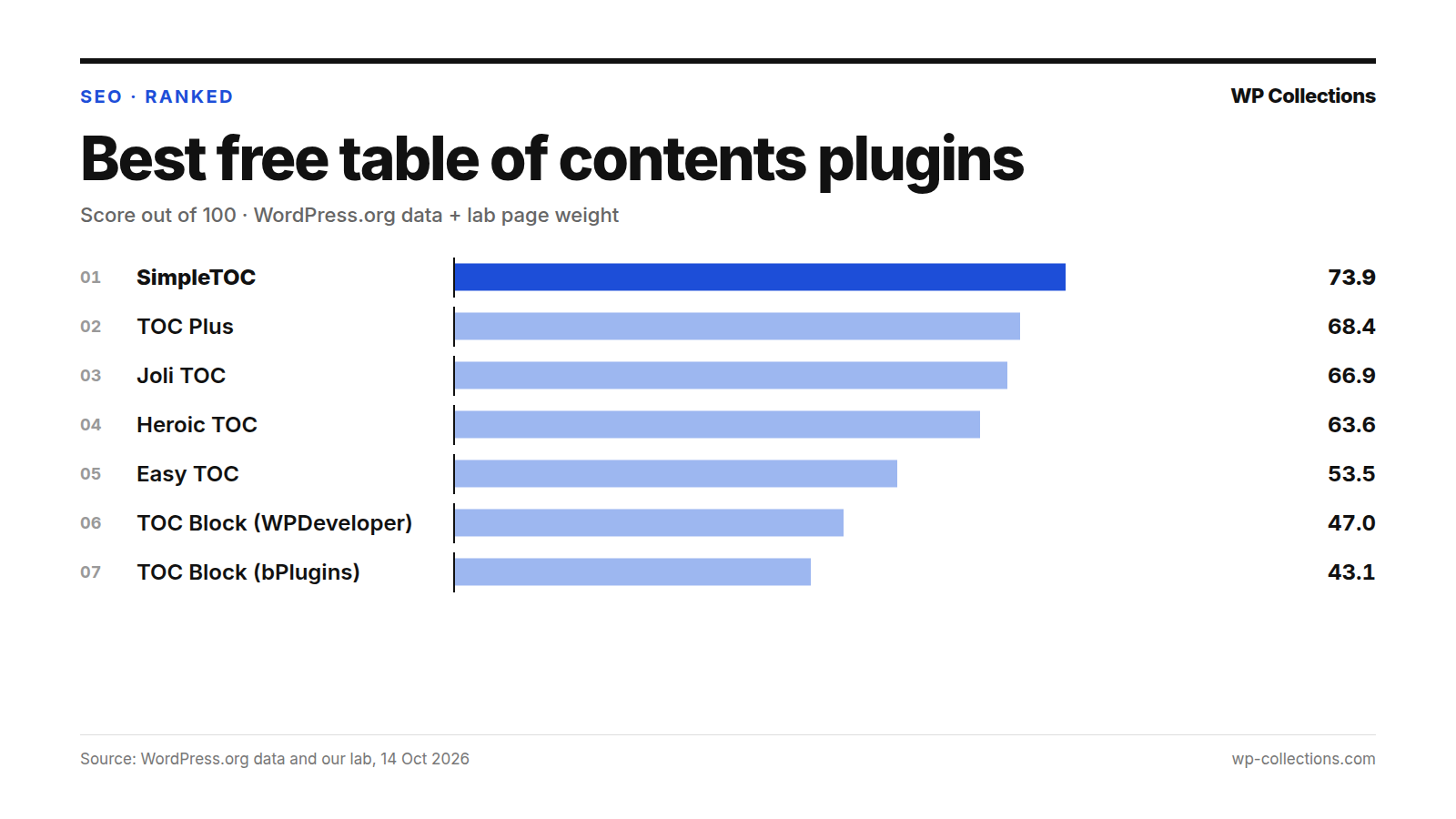
The best free table of contents plugin for WordPress on our data is SimpleTOC, with 73.9 out of 100. Table of Contents Plus is second on 68.4 and Joli Table Of Contents third on 66.9. We scored seven free plugins on their WordPress.org record and on how much weight each one added to a real post in our lab.
Page weight decided the order. SimpleTOC added 0.6 KB to our test post. Table of Contents Plus has the best WordPress.org record of the seven, 84.4 out of 100, but it added 38.2 KB, and that pulled it to second. Easy Table of Contents, the most installed at 600,000+, added 42.9 KB with default settings: more than twice the 19.8 KB of the whole test page before any plugin.
Short answer: On the block editor, use SimpleTOC, the lightest table of contents we measured. If you want one on every long post without adding a block each time, use Table of Contents Plus. If you want many styles and three ways to insert it, try Joli Table Of Contents. For a small block with four ready styles, Heroic Table of Contents.
Last updated: 14 October 2026. We re-run the numbers every month.
The top 7 at a glance
| # | Plugin | Score | Installs | Rating | Weight added | How it’s added |
|---|---|---|---|---|---|---|
| 1 | SimpleTOC | 73.9 | 10,000+ | 98% | +0.6 KB | Block |
| 2 | Table of Contents Plus | 68.4 | 200,000+ | 90% | +38.2 KB | Automatic; shortcode, widget |
| 3 | Joli Table Of Contents | 66.9 | 7,000+ | 98% | +9.4 KB | Block, shortcode or auto-insert |
| 4 | Heroic Table of Contents | 63.6 | 5,000+ | 94% | +3.5 KB | Block |
| 5 | Easy Table of Contents | 53.5 | 600,000+ | 88% | +42.9 KB | Automatic by post type; shortcode, widget |
| 6 | Table Of Contents Block | 47.0 | 10,000+ | 86% | +36.9 KB | Block |
| 7 | Table Of Content Block | 43.1 | 3,000+ | 100% | +60.1 KB | Block |
How we scored them
Each plugin gets a score out of 100. Eighty points come from its WordPress.org record and twenty from page weight measured in our lab:
- WordPress.org record, 80 points: our WordPress.org score out of 100, scaled to 80. That score is Satisfaction 35 (the star rating, blended with 25 imaginary votes at 80% so a handful of reviews cannot carry a plugin), Adoption 25 (active installs on a log scale, 1,000 = 0 and 1,000,000 = full), Maintenance 20 (full marks for an update in the last 30 days, sliding to 0 at 365 days) and Support 20 (the share of the last two months’ support threads marked resolved; fewer than 3 threads earns half marks).
- Page weight, 20 points: 0 KB added earns 20 points and 40 KB or more earns 0, in a straight line between.
Our lab is a fresh WordPress 7.1.3 install on PHP 8.5 with the Twenty Twenty-Five theme and no other plugins. The test post has about 1,500 words, 8 h2 sections, 3 h3 headings and 3 images, loaded by a logged-out visitor. Weight added is the HTML plus every CSS and JS file the page links, gzipped, minus the same page with no plugin (19.8 KB).
Each plugin was installed from WordPress.org on 14 October 2026 and activated alone with default settings. Table of Contents Plus and Easy Table of Contents insert a table of contents on their own, so we measured them on the plain post. The other five add theirs as a block, so we measured them on a copy of the post with their block placed at the top: those numbers are with a table of contents showing.
We also time the server and list it in the full table, but server time is not part of this score. Each server figure is the median of at least three separate lab runs, each a median of 15 requests: a plugin’s first load can be slow while it sets itself up, so one run does not decide it. Plugins with no update in 365 days are out of the running. The full method is on how we rank.
1. SimpleTOC, 73.9
SimpleTOC – Table of Contents Block adds a block that builds a nested list of links to the headings in a post. You add it like any block, by searching for “SimpleTOC” or “TOC”. Its page promises “No JavaScript or CSS by default”: the accordion, smooth scrolling and box style are optional and “add minimal assets only when enabled”. It says the plugin is designed for WCAG 2.2 level AA and inherits the style of your theme.
Our lab agrees with the page. With its block on the post, it added 0.6 KB, which earns 19.7 of 20 weight points. Its WordPress.org score is 67.7: a 98% rating (77 ratings) and an update on 3 October 2026 earn near-full marks, but 10,000+ installs earn 8.3 of 25 for adoption, and it had only one support thread in the last two months, which earns half marks for support.
It suits anyone on the block editor who wants a plain table of contents that looks like the rest of the site. The limit is the method: it is a block, so you add it to each post yourself.
2. Table of Contents Plus, 68.4
Table of Contents Plus – Automatic Table of Contents for Posts & Pages reads a post’s headings and inserts a table of contents on its own. Its installation notes say that once activated, it appears on posts and pages with at least three headings. You choose where it goes (before the first heading, after the first paragraph, at the top or at the bottom), and there is a [toc] shortcode for manual placement, [no_toc] to hide it on one post, and a widget for the sidebar.
It has the best WordPress.org record of the seven, 84.4 out of 100: 200,000+ installs, an update on 17 September 2026, and all 6 of its recent support threads resolved. Its rating is 90% (184 ratings). Page weight is what keeps it second: on our test post it added 38.2 KB, almost twice the 19.8 KB test page itself, which leaves 0.9 of 20 weight points.
It suits sites with many long posts, and editors who would rather not insert a block every time. If you pick it, set the minimum number of headings in its settings so short posts stay clean, as its page suggests.
3. Joli Table Of Contents, 66.9
Joli Table Of Contents – Table of Contents with Gutenberg Block & Shortcode offers three ways in: auto-insert by post type and position, a block, and the [joli-toc] shortcode. Its page lists themes with dark mode, a color palette that styles the whole box from one accent color, a reading time estimate, and an onboarding wizard after activation. It also says a filter lets it answer another plugin’s shortcode tag, so old shortcodes keep working when you switch.
With default settings it added nothing to our plain post, so we measured it with its block placed: +9.4 KB, worth 15.3 of 20. It was updated on 13 October 2026, the day before our check, and is rated 98% (43 ratings). Its 7,000+ installs earn 7.0 of 25 for adoption.
One number to know before you install: it added the most server time of the seven, a median of +32.3 ms across five runs (11.0, 39.1, 42.8, 32.3 and 17.4 ms). Easy Table of Contents was close behind at +25.2 ms, a gap within noise. Server time is not in this score, but on a busy site on modest hosting it adds up.
4. Heroic Table of Contents, 63.6
Heroic Table of Contents is a block that detects the headings on a page and offers 4 built-in styles, bulleted, numbered or plain lists, and a list readers can expand and collapse. You can hide or relabel a heading without changing the post, and use several blocks to index long content in parts. Its page says it also works in templates through a Template Mode.
It is light: +3.5 KB with its block in place, worth 18.2 of 20. Its record is thinner. It has 5,000+ installs (5.8 of 25 for adoption) and a 94% rating from only 10 ratings, which our blend pulls toward 80%. It was updated 14 September 2026.
It suits block-editor sites that want a few ready styles without a long settings page. The caution is the small rating count: 10 ratings tell you less than a few hundred.
5. Easy Table of Contents, 53.5
Easy Table of Contents builds a table of contents from a post’s headings and can insert it automatically for the post types you enable. Its page lists a widget that can stick to the page as readers scroll, the [ez-toc] shortcode, several built-in themes, and support for the Classic Editor, Gutenberg, Divi, Elementor, WPBakery and Visual Composer. A Gutenberg block is listed as a Pro feature. Its page says it began as a fork of Table of Contents Plus.
It is the most installed plugin here, 600,000+, rated 88% (221 ratings). Two numbers pull it to fifth. On our test post with default settings it added 42.9 KB, more than twice the 19.8 KB of the whole test page before any plugin, which earns 0 of 20 weight points. And none of its 5 recent support threads were marked resolved, 0 of 20 for support.
Its FAQ says the default post type is Pages, so on a blog you may need to enable posts in its settings first. It suits sites built with a page builder or the Classic Editor that want a table of contents without a block and can accept the weight.
6. Table Of Contents Block, 47.0
Table Of Contents Block, from WPDeveloper, adds a block that builds a table of contents from the heading tags you pick. Its page describes it as “Super Light-weight: No extra resources used”.
Our lab measured otherwise: with its block on the post, it added 36.9 KB, worth 1.6 of 20. Its WordPress.org score is 56.7, from 10,000+ installs, an 86% rating from only 7 ratings, and an update on 9 September 2026.
SimpleTOC and Heroic Table of Contents do the same job as a block and added 0.6 KB and 3.5 KB on the same post, so there is little reason to choose this one on our numbers.
7. Table Of Content Block, 43.1
Table Of Content Block – Auto-Generate Clickable Table of Contents, from bPlugins (note the singular “Content”), is a block that scans a post’s headings and builds a clickable list with smooth scrolling and anchor links. You add it from the “widgets” block category, and its page says it stays in sync with your content as you edit.
It added the most weight of any plugin we measured for this list: 60.1 KB with its block in place, three times the 19.8 KB test page, for 0 of 20 weight points. It has 3,000+ installs and four ratings, averaging 100%, and lists WordPress 6.9.10 as the latest version tested, older than the 7.1.3 the other six list.
It is also the youngest plugin here, added to WordPress.org on 23 March 2025. Give it time to build a record before you rely on it.
Every plugin we measured
| # | Plugin | Score | WordPress.org score | Weight added (points /20) | Server time | Updated |
|---|---|---|---|---|---|---|
| 1 | SimpleTOC | 73.9 | 67.7 | +0.6 KB (19.7/20) | +3.5 ms | 3 Oct 2026 |
| 2 | Table of Contents Plus | 68.4 | 84.4 | +38.2 KB (0.9/20) | +18.1 ms | 17 Sep 2026 |
| 3 | Joli Table Of Contents | 66.9 | 64.5 | +9.4 KB (15.3/20) | +32.3 ms | 13 Oct 2026 |
| 4 | Heroic Table of Contents | 63.6 | 56.8 | +3.5 KB (18.2/20) | +2.1 ms | 14 Sep 2026 |
| 5 | Easy Table of Contents | 53.5 | 66.9 | +42.9 KB (0/20) | +25.2 ms | 16 Sep 2026 |
| 6 | Table Of Contents Block | 47.0 | 56.7 | +36.9 KB (1.6/20) | +5.6 ms | 9 Sep 2026 |
| 7 | Table Of Content Block | 43.1 | 53.9 | +60.1 KB (0/20) | +1.4 ms | 8 Oct 2026 |
| Out | LuckyWP Table of Contents | – | 59.5 | +2.8 KB (shortcode placed) | +5.9 ms | 16 Apr 2025 |
| Out | Rich Table of Contents | – | 39.1 | +42.0 KB | +17.6 ms | 30 Apr 2025 |
What we left out, and why
Two table of contents plugins are out of the running because they have not been updated in over a year. Our rule drops any plugin with no update in 365 days.
- LuckyWP Table of Contents: last updated 16 April 2025, 546 days before our check. It has 100,000+ installs and a 98% rating (884 ratings), and lists WordPress 6.7.10 as the latest version tested.
- Rich Table of Contents: last updated 30 April 2025, 532 days before our check. It has 20,000+ installs and an 82% rating (17 ratings). It inserts a table of contents on its own, and on our plain post it added 42.0 KB.
Many lists still recommend LuckyWP. It has more ratings than any plugin in this article, and it is light: placed with its shortcode, it added 2.8 KB in our lab. But it has had no release since 16 April 2025 while WordPress has kept shipping new versions. If you already run it, it may work fine today; check its page for a new release before you build on it.
How to choose the best free table of contents plugin for WordPress
- Decide how you want to add it. A block means one click per post and nothing on posts where you skip it. An automatic plugin covers every long post, old ones included.
- On the block editor, start with SimpleTOC. If you want ready-made styles, try Heroic Table of Contents or Joli Table Of Contents.
- For automatic insertion, use Table of Contents Plus and set the minimum number of headings and the post types in its settings.
- If you switch from another plugin, look for its shortcodes in old posts. Joli’s page says it can answer another plugin’s shortcode tag, so those posts keep a table of contents.
- Check the weight on your own site: open a post as a logged-out visitor, note the transferred size in your browser’s network tab, then activate the plugin and compare.
Questions people ask
Which is the best free table of contents plugin for WordPress?
On our data, SimpleTOC, with 73.9 out of 100. Table of Contents Plus (68.4) has the better WordPress.org record but added 38.2 KB to our test post; SimpleTOC added 0.6 KB.
Does a table of contents plugin slow down a page?
It can add weight. With a table of contents showing, the plugins we tested added between 0.6 KB (SimpleTOC) and 60.1 KB (Table Of Content Block) to a 19.8 KB page. Three of the seven added under 10 KB.
Which plugins add a table of contents automatically?
Table of Contents Plus: its page says it appears once activated, on posts and pages with at least three headings. Easy Table of Contents inserts automatically for the post types you enable, Pages by default. Joli Table Of Contents has an auto-insert setting by post type.
Is Easy Table of Contents still a good choice?
It is maintained (updated 16 September 2026) and has 600,000+ installs with an 88% rating. On our post it added 42.9 KB with default settings, and none of its 5 recent support threads were marked resolved, which is why it ranks fifth.
Why is LuckyWP Table of Contents not ranked?
It was last updated on 16 April 2025, 546 days before our check, and our rule drops plugins with no update in 365 days. It is well rated (98%, 884 ratings) and light in our lab (2.8 KB).